

Quick answer
An administrator can handle aircon service bookings and reminders by recording each request in the same way, confirming times from the technician’s diary, sending reminders only to customers who agreed, and recording outcomes. Technicians keep diagnosis and urgent or safety issues, which are escalated at once. Staffing details and hours need confirming before any commitment.
- Record each request the same way, including contact, area, unit details, problem in the customer’s words, access and preferred times.
- Send reminders only to customers who agreed, use the interval technicians recommend, give an opt-out and stop after limited attempts.
- Send reports of leaks onto electrics, burning smells or smoke to a technician immediately, with only an approved holding message.
Servicing is repeat business, and reminders bring customers back. An administrator can handle scheduling and reminders while technicians keep technical decisions. This guide sets out the workflow. Staffing details, hours and tools need confirmation before any commitment. Nothing here promises round-the-clock or emergency coverage.
1. Capture service requests
Record each request the same way: the customer’s name and contact, the address or area, the unit details they can provide, the problem in their own words, access arrangements and preferred times. The administrator does not diagnose. If the customer asks “What do you think is wrong?”, the response is: “I will pass this to a technician who can advise.”
2. Confirm access and availability
Confirm times from the technician’s diary, not from guesses. Note building rules, such as access permits, lift bookings or contact people for tenants. Send a confirmation with the date, time window and any preparation, such as clear access to the unit. Tell the technician immediately about changes.
3. Send agreed reminders
Reminders help customers book routine servicing, but only if they are wanted.
- Send reminders only to customers who agreed.
- Use the interval your technicians recommend.
- Keep messages short and give an easy way to opt out.
- Stop after a limited number of attempts.
4. Escalate urgent and technical issues
Reports of water leaking onto electrics, burning smells, smoke or anything that sounds unsafe go to a technician immediately by the agreed method. Questions about faults, parts or performance go to a technician. The administrator gives only an approved holding message.
5. Record outcomes and review
After each visit, record the outcome and the next service date if the customer agrees. Review monthly: reply times, missed or double bookings, reminder responses and opt-outs. Use a named login for each team member, with access limited to what the role needs.
Booking and reminder workflow
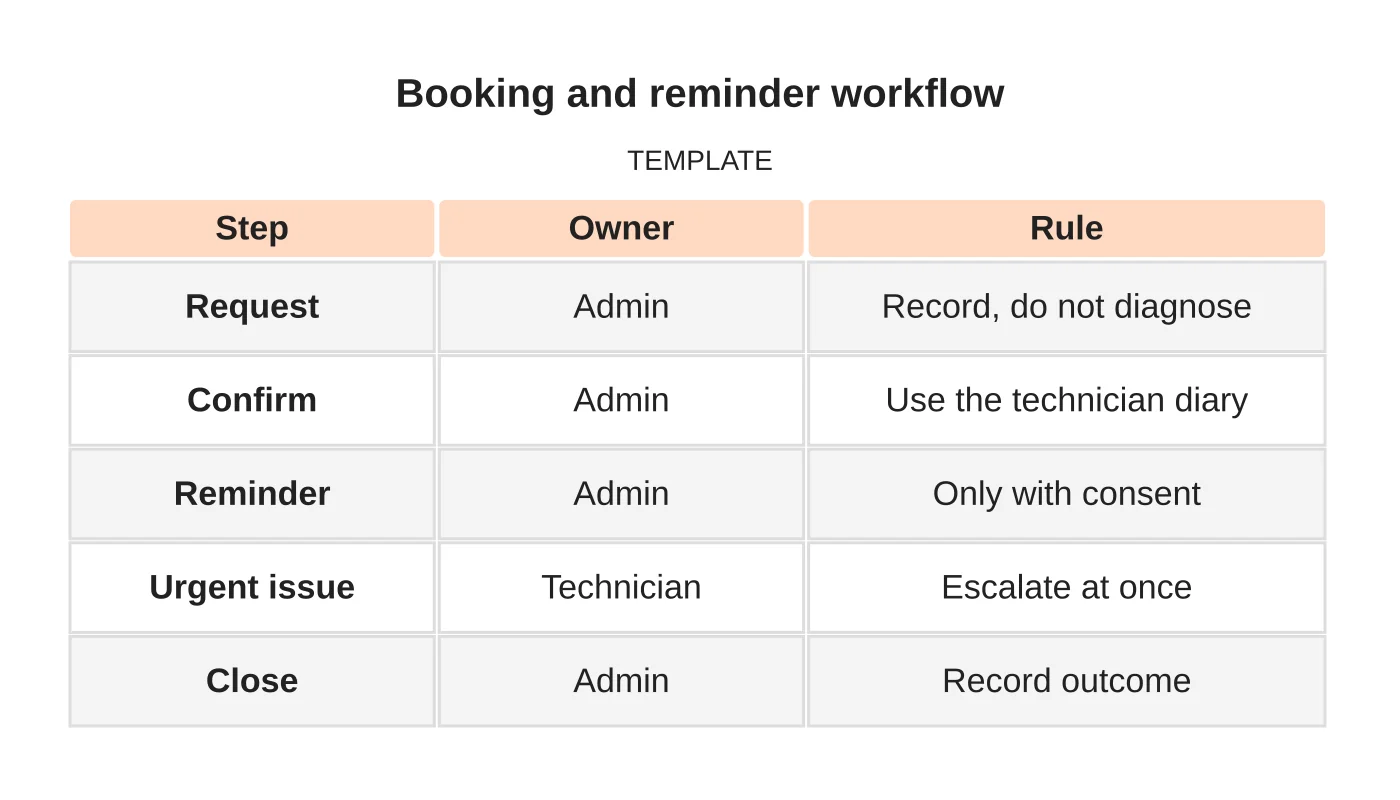
| Step | Owner | Rule |
|---|---|---|
| Request | Admin | Record, do not diagnose |
| Confirm | Admin | Use the technician diary |
| Reminder | Admin | Only with consent |
| Urgent issue | Technician | Escalate at once |
| Close | Admin | Record outcome |
Common mistakes
- Letting administrators diagnose.
- Promising arrival times not agreed with technicians.
- Sending reminders to people who did not agree.
- No escalation method.
- Sharing logins.
Questions contractors ask
How often should reminders go out? Follow your technicians’ guidance and the customer’s preference, and keep the number small.
Can it cover after-hours requests? Only if agreed, staffed and described accurately.
See the air-conditioning website guide and attracting local enquiries.
Related reading: Air-Conditioning Installation vs Servicing Pages: What Each Customer Needs to Know.
Next step
Share your recurring tasks, required hours and approval boundaries so Web Design Davao can discuss a suitable staffing role. Read about our outsourced staffing service or contact us.
Frequently asked questions
How often should service reminders go out?
Follow your technicians’ guidance and the customer’s preference, and keep the number small. Send reminders only to customers who agreed, keep messages short, give an easy way to opt out and stop after a limited number of attempts.
Can an administrator diagnose air-conditioning faults?
No. The administrator records the problem in the customer’s own words and passes it on. If asked what is wrong, the reply is that the request is going to a technician who can advise. Fault, parts and performance questions go to a technician.
Can administrative support cover after-hours requests?
Only if it is agreed, staffed and described accurately. Nothing about this arrangement promises round-the-clock or emergency coverage, and staffing details, hours and tools need confirmation before any commitment. Urgent issues go to a technician by an agreed method.
Sources and notes
Last updated 21 November 2026. This guide is general information based on Web Design Davao’s web design and digital marketing practice. It cites no statistics and makes no promise about rankings, enquiries or contracts. Web Design Davao is not licensed or certified in this industry, so check technical, safety, legal and regulatory matters with a suitably qualified professional. Examples are templates or illustrations, not client results.


