

Quick answer
A remote administrator can handle plumbing bookings and customer updates by recording enquiries in the customer’s words, confirming appointments from the plumber’s diary, sending approved message templates and keeping job records. The administrator must not diagnose problems, give technical advice or promise outcomes, and urgent issues go straight to a qualified person.
- Escalate flooding, burst pipes, sewage, gas smells, no water or health concerns straight to a qualified person.
- Offer only times the plumber has agreed, then send a confirmation and a reminder before the visit.
- Check a sample of records and messages each week for the first month, and adjust templates.
Plumbers on a job cannot answer every call or manage every booking. A remote administrator can handle bookings and updates, but must not diagnose problems, give technical advice or promise outcomes. This standard operating procedure (SOP) sets out the boundary and the steps. Staffing availability, hours and tools need confirmation before any commitment, and nothing here promises round-the-clock or emergency coverage.
1. Capture job information without diagnosing
Record each enquiry the same way:
- the customer’s name and contact number,
- the address or area and access details, such as gate, building or tenant arrangements,
- what the customer says the problem is, in their own words,
- any photographs they provide,
- preferred times and how they found the business.
The administrator does not suggest causes or fixes. If the customer asks “Is it serious?”, the answer is: “I will pass this to a plumber who can advise you.”
2. Confirm access and appointments
Confirm appointments from the diary the plumber controls. Offer only times the plumber has agreed, send a confirmation with the date and time window, and send a reminder before the visit. Note access details and any constraints, such as landlord permission. Tell the plumber immediately about changes. Do not promise arrival times that have not been confirmed.
3. Send agreed updates
Use short, approved templates for confirmations, delays, quote follow-ups and thanks. A delay message might say: “Our plumber is running late and will arrive after the time we gave you. We will confirm a new time shortly.” Do not describe the cause of a plumbing problem or the work to be done unless the plumber has approved the text.
4. Escalate urgent technical issues
Any mention of flooding, a burst pipe, sewage, a gas smell, no water to a home or a health concern goes straight to a qualified person by the agreed method, usually a phone call. The administrator gives only an approved holding message.
5. Keep records and follow up
Record each job’s status: new, booked, attended, quoted and completed. After a job, send a brief thank-you and, if appropriate, a review request. Follow up quotes a limited number of times and stop if the customer declines or does not respond. Follow-up should reach only people who agreed to be contacted.
6. Review the first month
Check a sample of records and messages each week. Look at the time to first reply, missed or double bookings, how escalations were handled and customer feedback about communication. Adjust templates. Use a named login for the administrator, restricted to what the role needs.
Plumbing administration SOP
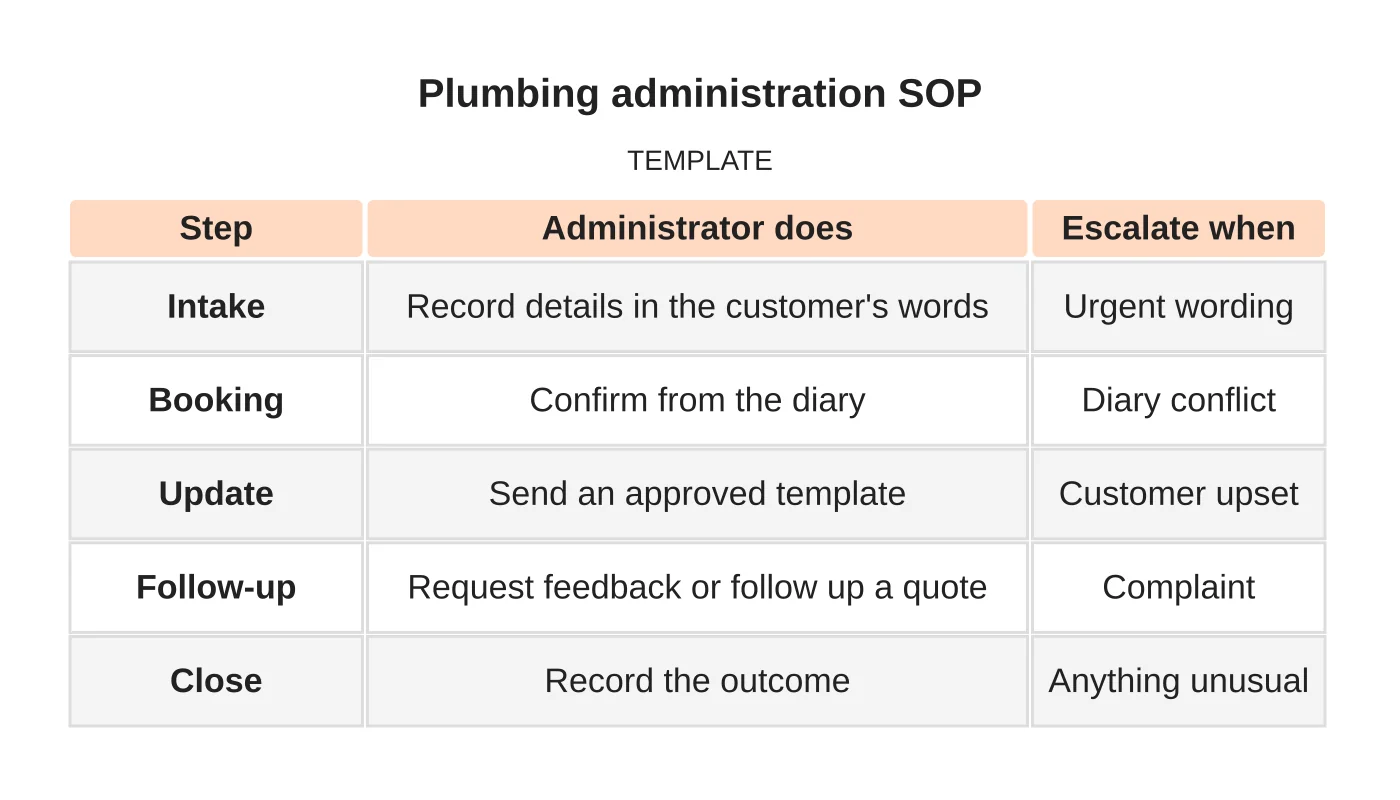
| Step | Administrator does | Escalate when |
|---|---|---|
| Intake | Record details in the customer’s words | Urgent wording |
| Booking | Confirm from the diary | Diary conflict |
| Update | Send an approved template | Customer upset |
| Follow-up | Request feedback or follow up a quote | Complaint |
| Close | Record the outcome | Anything unusual |
Related reading: Emergency Plumbing vs Planned Maintenance: Designing Different Enquiry Journeys.
Common mistakes
- Letting administrators explain causes or fixes.
- Promising arrival times the plumber has not agreed.
- No agreed escalation method.
- Using personal accounts or shared passwords.
- Following up with people who have declined.
Questions plumbers ask
Which tasks suit a remote administrator? Recording enquiries, confirming and reminding appointments, sending approved messages and keeping records. Attending, diagnosing and pricing stay with you.
Can it cover after-hours calls? Only if it has been agreed, staffed and described accurately. Do not advertise it before that.
Do I need written procedures? Yes. A short written SOP and escalation list make training faster and reduce mistakes.
See the plumbing website guide and local SEO for plumbers.
Next step
Share your recurring tasks, required hours and approval boundaries so Web Design Davao can discuss a suitable staffing role. Read about our outsourced staffing service or contact us.
Frequently asked questions
Which plumbing tasks suit a remote administrator?
Recording enquiries, confirming and reminding appointments, sending approved messages and keeping records. Attending jobs, diagnosing and pricing stay with the plumber. If a customer asks whether a problem is serious, the administrator passes it to a plumber who can advise.
Can a remote administrator cover after-hours calls?
Only if it has been agreed, staffed and described accurately. Do not advertise it before that. Staffing availability, hours and tools need confirmation before any commitment, and nothing promises round-the-clock or emergency coverage.
What should an administrator record for each plumbing enquiry?
Record the customer’s name and contact number, the address or area and access details, the problem in the customer’s own words, any photographs, and preferred times. The administrator does not suggest causes or fixes. Use a named login restricted to what the role needs.
Sources and notes
Last updated 21 November 2026. This guide is general information based on Web Design Davao’s web design and digital marketing practice. It cites no statistics and makes no promise about rankings, enquiries or contracts. Web Design Davao is not licensed or certified in this industry, so check technical, safety, legal and regulatory matters with a suitably qualified professional. Examples are templates or illustrations, not client results.


