
Quick answer
A solar quote form should gather what a first assessment needs without losing people. Ask easy questions first: contact details, property type, roof or site type with an ‘I am not sure’ option, main goal and timing. Make the electricity bill upload optional and secure, explain the next steps, and test on mobile.
- Avoid questions buyers cannot answer, such as inverter types; the assessor will cover technical details.
- Explain why you ask for bills, use a secure upload instead of ordinary email, and say who sees it.
- Do not state savings or promise outcomes; describe the call, assessment, written quote and follow-up sequence honestly.
A solar quote cannot be accurate without information, but long forms lose people. The aim is a form that gathers what a first assessment needs, explains the next step and treats personal data carefully. This guide covers the fields, the handling of electricity bills and site information, and testing on mobile.
1. Ask about property and customer goals
Start with the questions a buyer can answer easily.
- Who and where: name, phone, email and the area of the property.
- Property type: home or business, and whether the buyer owns or rents.
- Roof or site type: simple options, with an “I am not sure” choice.
- Main goal: for example reducing bills, backup power or a business sustainability goal.
- Timing: when they hope to proceed.
Avoid questions about technical details a buyer cannot know, such as inverter types. Your assessor will cover those.
2. Request bills or site information securely
Electricity bills help with sizing, but they contain personal and account data. Handle them carefully.
- Make the upload optional so buyers who do not have a bill handy can still enquire.
- Explain why you ask: “This helps us understand usage before the assessment.”
- Use a secure upload instead of ordinary email, and say who can see it and how long you keep it.
- Ask only for what you need.
3. Explain assessment and quote steps
Tell the buyer what happens after they submit: a call, a site assessment, a written quote and a follow-up, and roughly when each occurs. Do not state savings or promise a particular outcome. A short, honest sequence builds confidence and reduces anxious calls.
State what the assessment involves and whether it is free or charged. Keep the wording consistent with how your team really works.
4. Test mobile completion and routing
Most buyers will start on a phone. Complete the form on a phone and check that:
- fields are easy to tap and errors are clear,
- uploads work on mobile,
- a named person receives each submission,
- an acknowledgement reaches the buyer,
- the thank-you page repeats the next steps.
Retest after any website change. See the solar digital marketing guide for the wider journey and following up solar quotes for what happens after the form.
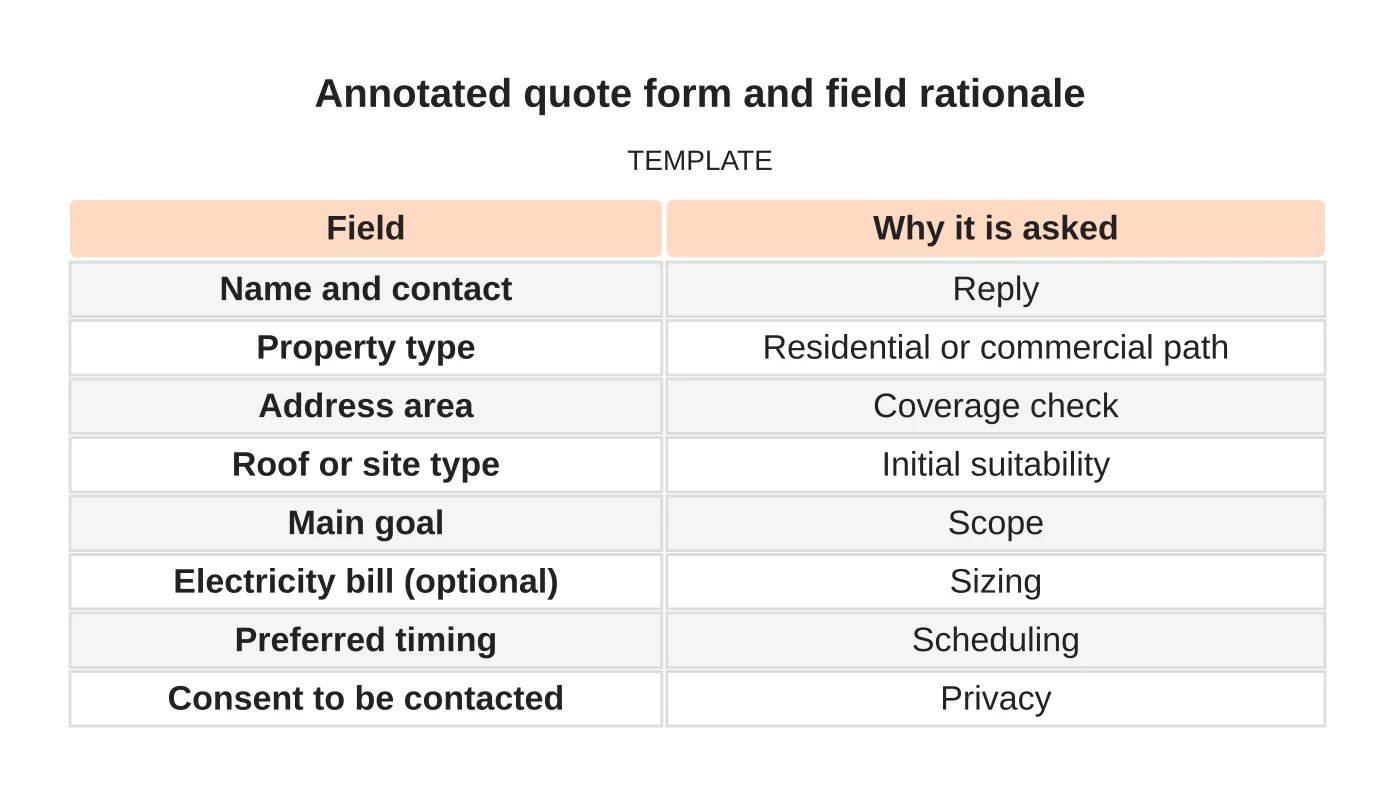
Annotated quote form and field rationale
| Field | Why it is asked |
|---|---|
| Name and contact | Reply |
| Property type | Residential or commercial path |
| Address area | Coverage check |
| Roof or site type | Initial suitability |
| Main goal | Scope |
| Electricity bill (optional) | Sizing |
| Preferred timing | Scheduling |
| Consent to be contacted | Privacy |
Common mistakes
- Asking for technical details buyers cannot give.
- Requiring a bill upload.
- Collecting personal data without explaining why.
- Not testing on mobile.
- Leaving submissions in a shared inbox with no owner.
Questions installers ask
How many fields is too many? There is no fixed number. Keep to what the first assessment needs and test whether people complete the form.
Should the form show prices? Explain how you quote instead. If you show indicative figures, state their basis.
Do I need a phone option? Yes. Some buyers prefer to talk, and a visible phone number reduces drop-off.
Next step
Request a website review or discuss the pages and enquiry workflow your business needs. Read about our web design service or contact us.
Frequently asked questions
How many fields should a solar quote form have?
There is no fixed number. Keep to what the first assessment needs and test whether people complete the form. Start with questions a buyer can answer easily, and keep a visible phone number because some buyers prefer to talk.
Should customers have to upload an electricity bill?
No, make it optional so buyers without a bill handy can still enquire. Explain why you ask, use a secure upload instead of ordinary email, say who can see it and how long you keep it, and ask only for what you need.
What should happen after someone submits the form?
Tell them the sequence: a call, a site assessment, a written quote and a follow-up, and roughly when each occurs. Send an acknowledgement, name a person who receives each submission, and do not state savings or promise a particular outcome.
Sources and notes
Last updated 21 November 2026. This guide is general information based on Web Design Davao’s web design and digital marketing practice. It cites no statistics and makes no promise about rankings, enquiries or contracts. Web Design Davao is not licensed or certified in this industry, so check technical, safety, legal and regulatory matters with a suitably qualified professional. Examples are templates or illustrations, not client results.


