

Quick answer
Workshop service pages help drivers choose the right booking by separating service types, explaining what information is needed before quoting, showing booking steps and routing diagnostic questions to qualified staff. Say that some jobs need an inspection before a quote, avoid diagnosing by message, and show only availability you actually have.
- Give routine servicing, repairs and inspections their own sections, each saying what is included and which vehicles are covered.
- Ask for make, model, year and the symptom in the driver’s words, and say when inspection precedes a quote.
- Tell drivers describing something unsafe, such as brake failure, not to drive and to call you or a roadside service.
Drivers want to know whether you do their job and how to get it booked. Clear service pages answer both without making promises the workshop cannot keep. This guide gives a page template and the cautions that go with it.
1. Separate service types clearly
Give routine servicing, repairs, inspections and any specialist work their own sections or pages. Each should say what is included, which vehicles are covered and what the next step is. Avoid one long page that mixes everything, because drivers searching for a specific job want to see it named.
2. Explain information needed before quoting
Ask for vehicle make, model and year, the symptom in the driver’s words and, if useful, photos or a warning light description. Say that some jobs need an inspection before a quote, and explain how that works. Avoid committing to a price for a fault you have not seen.
3. Present availability and booking steps
Show how to book, how long you usually take to confirm and what the driver should bring or arrange, such as keys and service history. Do not show availability you do not have, and keep any calendar current.
4. Route diagnostic questions to qualified staff
Do not diagnose through the page, a chat or an admin message. Direct fault and safety questions to a technician. If a driver describes something that sounds unsafe, such as brake failure, say the vehicle should not be driven and that they should call you or a roadside service.
5. Test and review
Submit test requests, check routing and confirmations and review which pages produce bookings. See the workshop website guide and service reminders.
Workshop booking-page template
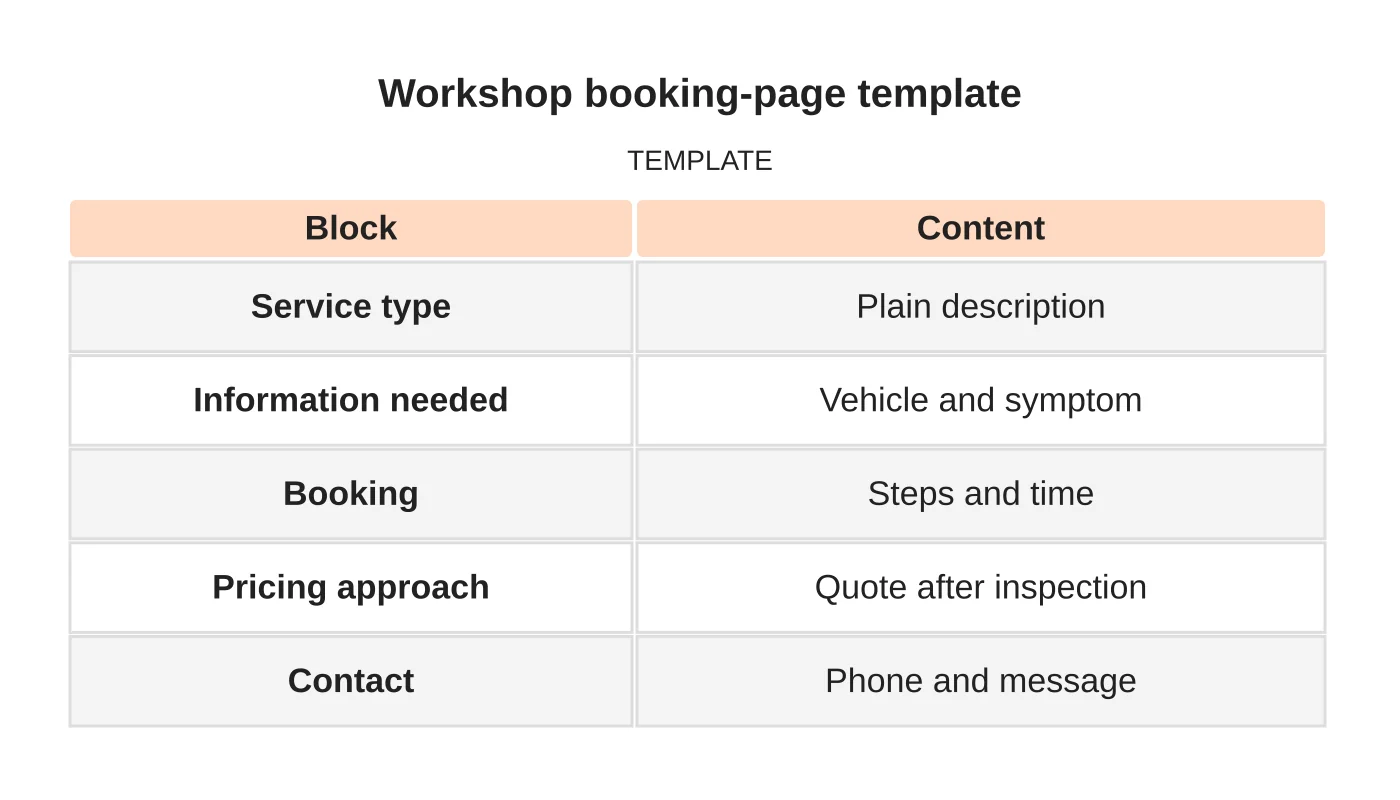
| Block | Content |
|---|---|
| Service type | Plain description |
| Information needed | Vehicle and symptom |
| Booking | Steps and time |
| Pricing approach | Quote after inspection |
| Contact | Phone and message |
Common mistakes
- One page for every service.
- Quoting without seeing the fault.
- Showing slots that are full.
- Diagnosing by message.
- Untested booking forms.
Questions workshops ask
Should I list brands? Only those you service and are comfortable naming. Do not imply endorsement.
Can I show prices? For standard services, yes if kept current.
Next step
Request a website review or discuss the pages and enquiry workflow your business needs. Read about our web design service or contact us.
Frequently asked questions
Should a workshop quote a price without seeing the fault?
No. Avoid committing to a price for a fault you have not seen. Say that some jobs need an inspection before a quote and explain how that works. For standard services, prices can be shown if they are kept current.
What information should a booking form ask for?
Vehicle make, model and year, the symptom in the driver’s words and, if useful, photos or a warning light description. Also show how to book, how long you usually take to confirm and what the driver should bring, such as keys and service history.
Should staff diagnose faults through the website or chat?
No. Do not diagnose through the page, a chat or an admin message. Direct fault and safety questions to a technician. If something sounds unsafe, such as brake failure, say the vehicle should not be driven and that the driver should call.
Sources and notes
Last updated 21 November 2026. This guide is general information based on Web Design Davao’s web design and digital marketing practice. It cites no statistics and makes no promise about rankings, enquiries or contracts. Web Design Davao is not licensed or certified in this industry, so check technical, safety, legal and regulatory matters with a suitably qualified professional. Examples are templates or illustrations, not client results.


