
Quick answer
Separate AI bots into three jobs before editing robots.txt: training, search indexing and user requests. A sensible default is to allow the search index bots so you can be cited, and decide on training bots as a policy choice. Robots.txt is a request, not enforcement, so protect private pages with real access controls.
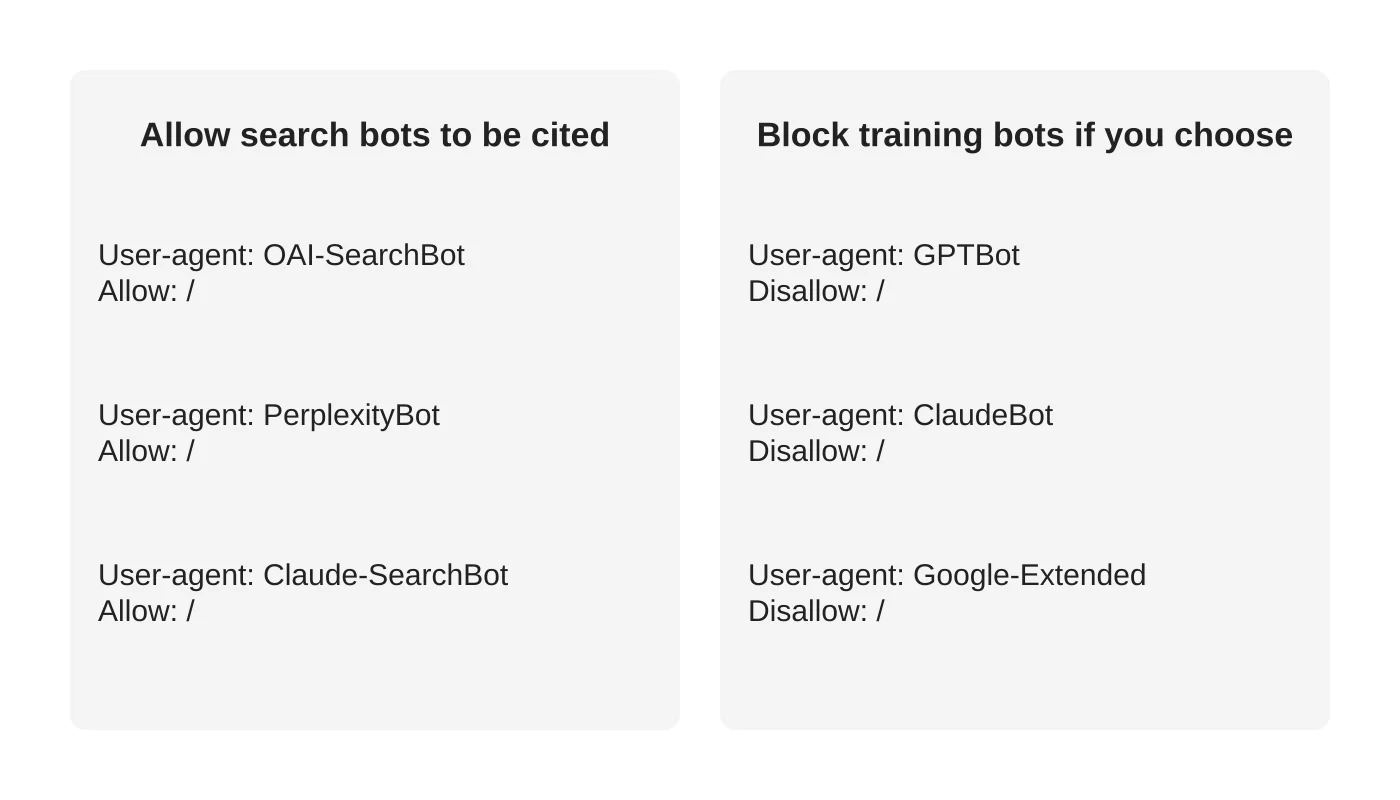
- Allow OAI-SearchBot, Claude-SearchBot and PerplexityBot if you want to appear in AI search answers.
- Check firewalls, security plugins and CDNs, which can block bots by default, and review server logs to see visits.
- Have someone who can test the file edit it, because a mistake can block search engines.
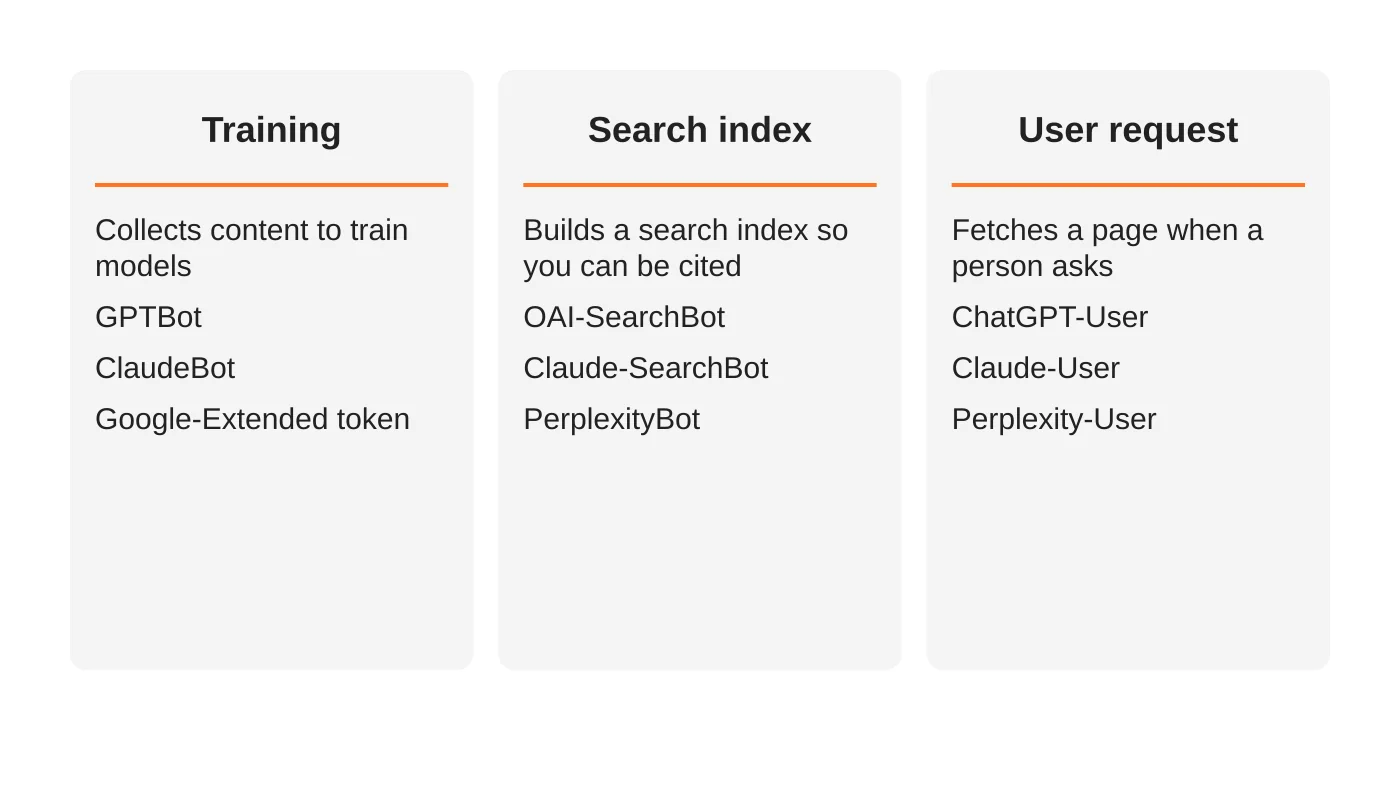
Every major AI company now runs several bots. Some collect content to train models, some build search indexes and some fetch a page when a person asks about it. If you block them all, you may disappear from AI answers. If you allow them all, you give up a choice about training. This guide explains the difference so you can decide on purpose.
It is a technical topic, but the decision is simple once you separate the three jobs.
The three jobs
1. Training bots
These collect content that may be used to train AI models.
- GPTBot (OpenAI). OpenAI says disallowing it indicates your content should not be used to train its generative AI foundation models.
- ClaudeBot (Anthropic). Anthropic says restricting it signals that future material should be excluded from training datasets.
- Google-Extended (a robots.txt token, not a crawler). It controls whether content Google crawls may be used to train and ground Gemini models. Google says it does not affect Google Search, and it does not remove you from AI Overviews or AI Mode.
2. Search index bots
These build the index that AI search uses to find and cite sources.
- OAI-SearchBot (OpenAI). OpenAI says sites that opt out will not be shown in ChatGPT search answers. It recommends allowing it if you want to appear, and says changes can take around 24 hours to take effect.
- Claude-SearchBot (Anthropic). Anthropic says blocking it may reduce your site’s visibility and accuracy in user search results.
- PerplexityBot (Perplexity). Perplexity recommends allowing it so your site appears in its results.
3. User-request bots
These fetch a page because a person asked.
- ChatGPT-User, Claude-User, Perplexity-User. OpenAI says robots.txt rules may not apply to ChatGPT-User because a person initiated the action. Perplexity says its user fetcher generally ignores robots.txt for the same reason. Anthropic says blocking Claude-User prevents retrieval in response to a user query and may reduce visibility.
Google’s own AI features use Googlebot and Google’s normal search systems. You control them with standard search controls and the Search Console setting, not Google-Extended. See the opt-out guide.
A sensible default for most businesses
If your goal is to be found and recommended:
- Allow the search index bots.
- Decide about training bots. Many businesses block them as a matter of policy. Others allow them. It is your content and your call.
- Do not rely on robots.txt to stop user-request bots. If a page must not be fetched, protect it with a login or server rules.
A sample file
“`
User-agent: OAI-SearchBot
Allow: /
User-agent: PerplexityBot
Allow: /
User-agent: Claude-SearchBot
Allow: /
User-agent: GPTBot
Disallow: /
User-agent: ClaudeBot
Disallow: /
User-agent: Google-Extended
Disallow: /
“`
This is an example, not advice for every site. Bot names and behaviour change, so check each company’s current documentation before you copy it.
Check the rest of your setup
- Your robots.txt is not the only gate. Firewalls, security plugins and CDNs can block bots by default. If you want to be cited, make sure they are not blocking search bots. See the five layers of website security.
- Keep a log. Server logs show which bots visit. A maintenance plan should review them. See what a maintenance plan should include.
- Verify the real bots. Some vendors publish IP ranges. Fake bots exist.
- Do not block your own admin or private areas by hiding them in robots.txt. The file is public. Use real access controls.
What it will not do
Robots.txt asks bots to behave. It does not enforce anything. Cloudflare published a report in 2025 alleging that one AI company used undeclared crawlers to get around no-crawl rules, which the company has disputed. Treat robots.txt as a polite request and use security controls for anything private.
Frequently asked questions
Will blocking GPTBot remove me from ChatGPT?
OpenAI says GPTBot and OAI-SearchBot are separate. Allowing OAI-SearchBot while blocking GPTBot is a documented option.
Do I need to do this at all?
If you do nothing, bots follow their defaults. A short, deliberate policy is better.
What about an llms.txt file?
That is a different thing and not a control. See do you need an llms.txt file.
Who should edit the file?
Someone who can test it. A mistake can block search engines. Ask your developer.
Sources
- Overview of OpenAI Crawlers, OpenAI
- Perplexity Crawlers, Perplexity
- Block or limit Anthropic’s bots, Claude Help Center
- Google-Extended, Google crawler documentation as reported by Search Engine Journal
- Perplexity is using stealth, undeclared crawlers, Cloudflare
Get it configured safely
Web Design Davao’s website maintenance team can review your robots.txt, firewall and logs together. Ask for a check.


