

Quick answer
Administrative support can handle electricians’ bookings, access details and quote follow-up, but must never make technical or safety decisions. The administrator records contact and location details, confirms appointments from the electrician’s diary, tracks quotes, and escalates any fault, safety or out-of-scope request to a qualified electrician using an agreed method.
- Escalate burning smells, smoke, sparks, shocks, exposed wiring or water near electrical equipment immediately, using a short approved script.
- Track each quote with status, value, date sent and next follow-up date, contacting only people who agreed.
- Use named logins, not shared passwords, and review a sample of bookings and messages each week in the first month.
An electrician on a job cannot answer every call or chase every quote. Administrative support can take over the paperwork and the follow-up, but it must never make technical or safety decisions. This article explains where the boundary sits and how a simple workflow keeps bookings and quotes moving.
Web Design Davao can discuss staffing roles of this kind, but availability, working hours, tools and role definitions need confirmation before any commitment. Nothing in this article promises round-the-clock or emergency coverage.
1. Capture contact and location details
The first task is accurate recording. When a customer calls or messages, the administrator records:
- the customer’s name and contact number,
- the address or area and any access instructions, such as gate codes or tenant contacts,
- what the customer says the problem is, in their own words,
- the preferred time and how they found the business.
The administrator does not diagnose. Words like “probably the breaker” belong to the customer, and are written down as the customer said them. This gives the electrician a clear starting point without implying any advice has been given.
2. Confirm appointments
The administrator confirms appointments from a diary that the electrician controls. Good practice includes:
- offering only times the electrician has agreed to,
- sending a confirmation with the date, time window and any preparation, such as access to the switchboard,
- sending a reminder the day before,
- noting changes and informing the electrician immediately.
The administrator should not promise arrival times the electrician has not confirmed, and should not make commitments about how long a job will take.
3. Track quotes and follow-ups
Quotes are lost when nobody owns them. A simple tracker records each quote with its status, value, date sent and next follow-up date. A reasonable pattern is:
- Send the quote and confirm receipt.
- Follow up once after a few days to ask whether the customer has questions.
- Send one final polite check after a further week.
- Close the quote and record the reason if the customer declines or does not reply.
Messages are short, honest and free of pressure. Customers who decline are thanked and not pursued. Follow-up should be limited to people who have agreed to be contacted.
4. Escalate safety and technical decisions
This is the most important rule. The administrator does not give advice on faults, safety or whether a job is possible. Certain words trigger immediate escalation to a qualified electrician by a method agreed in advance, such as a phone call:
- burning smell, smoke, sparks or hot switches,
- electric shock or tingling,
- exposed wiring,
- water near electrical equipment,
- power outages affecting a vulnerable person.
The administrator uses a short, approved script such as: “Thank you for telling us. I am passing this to one of our electricians now, and they will contact you.” Approved safety wording should come from a qualified electrician.
5. Keep records and review the first month
Agree what the administrator records and where, and give access only to what the role needs. Use a named login, not a shared password. In the first month, review a sample of bookings and messages each week, check that escalations worked and adjust templates.
Useful measures are the time to first reply, the number of quotes followed up on time, missed or double-booked appointments and customer complaints about communication. Do not treat the number of messages sent as a success measure.
Electrical admin role and escalation matrix
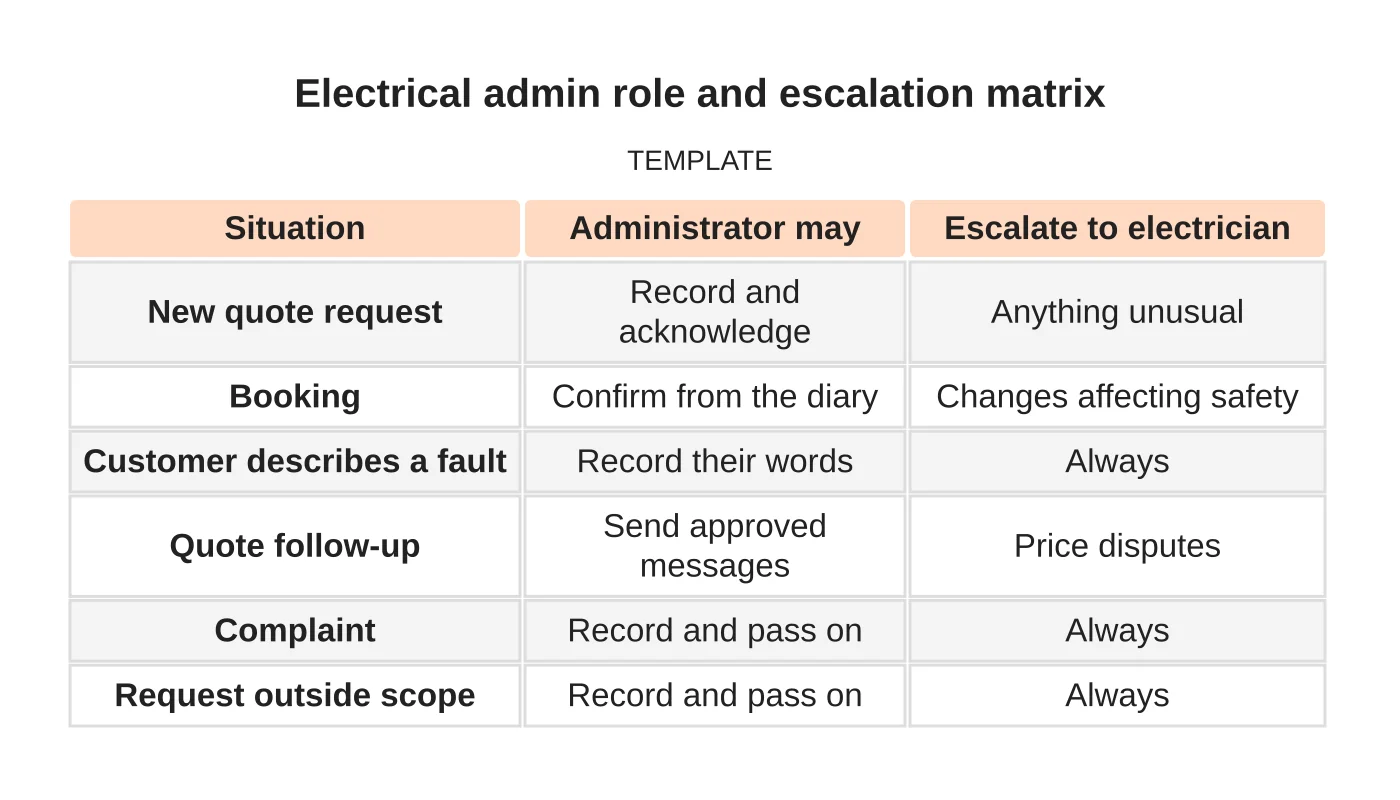
| Situation | Administrator may | Escalate to electrician |
|---|---|---|
| New quote request | Record and acknowledge | Anything unusual |
| Booking | Confirm from the diary | Changes affecting safety |
| Customer describes a fault | Record their words | Always |
| Quote follow-up | Send approved messages | Price disputes |
| Complaint | Record and pass on | Always |
| Request outside scope | Record and pass on | Always |
Common mistakes
- Letting administrators answer technical questions.
- No agreed escalation method or script.
- Promising arrival times the electrician has not agreed.
- Sharing one password across the team.
- Following up with people who asked not to be contacted.
Questions electricians ask
What tasks suit a remote administrator? Recording enquiries, confirming and reminding appointments, tracking quotes, updating a customer list and sending approved messages. Anything needing on-site presence or electrical judgement stays with you.
How quickly will I see a difference? It depends on how organised your current process is. Review the measures above after a month and decide from your own data.
Do I need written procedures first? Yes. Even a one-page set of steps and an escalation list makes training faster and results more consistent.
See the residential electrician website guide for how enquiries arrive and local SEO for electricians for how customers find you.
Next step
Share your recurring tasks, required hours and approval boundaries so Web Design Davao can discuss a suitable staffing role. Read about our outsourced staffing service or contact us.
Frequently asked questions
What tasks suit a remote administrator for an electrician?
Recording enquiries, confirming and reminding appointments, tracking quotes, updating a customer list and sending approved messages. Anything needing on-site presence or electrical judgement stays with the electrician. Availability, hours and tools need confirmation before any commitment.
Should the administrator answer questions about electrical faults?
No. The administrator does not give advice on faults, safety or whether a job is possible. They record the customer’s words and escalate to a qualified electrician, using an approved script such as telling the customer the matter is being passed to an electrician now.
How soon will an electrician see a difference?
It depends on how organised your current process is. Review measures such as time to first reply, quotes followed up on time, missed or double-booked appointments and complaints about communication after a month, and decide from your own data. Do not count messages sent as success.
Sources and notes
Last updated 21 November 2026. This guide is general information based on Web Design Davao’s web design and digital marketing practice. It cites no statistics and makes no promise about rankings, enquiries or contracts. Web Design Davao is not licensed or certified in this industry, so check technical, safety, legal and regulatory matters with a suitably qualified professional. Examples are templates or illustrations, not client results.


