
Quick answer
Choose between one website and separate branch websites on operational facts: how the business is owned and branded, how customers search, who can keep each site accurate and how enquiries will be tracked by branch. One site with a page per branch usually suits a single brand, while distinct names or owners may justify separate sites.
- Be honest about upkeep: several sites multiply updates, security checks and backups, and neglected sites do harm.
- Merging sites is a project: plan which pages move, how old addresses redirect and how forms and listings update.
- Write down the reasons, owners and a review date, and revisit the decision when branches or ownership change.
Every multi-location business eventually asks whether branches should share one website or each have their own. The answer is rarely about technology. It depends on how your business is owned and branded, how customers search, who can maintain what and what you can realistically keep accurate. This guide gives a way to compare the options and choose on operational facts. It makes no promise about rankings or enquiries.
Web Design Davao does not know your ownership structure. Where legal ownership, licensing or brand agreements affect the choice, confirm them with your adviser.
1. Compare ownership and brand structure
Start with how the business is set up. Are the branches one company, separate legal entities or independently owned? Is there one brand customers recognise, or do branches trade under different names? A single brand with central standards usually fits one website with a page per branch. Branches with distinct names, owners or audiences may justify separate sites, but each then needs its own owner, content and upkeep.
2. Consider user journeys and maintenance
Think about how customers choose. Many look for the nearest branch first, so a clear location chooser on one site shortens the journey. Then count what each option costs to keep accurate: one site means one set of updates, security checks and backups, while several sites multiply every task. Be honest about whether each branch has someone who will keep its site current. Neglected sites do more harm than a shared page that is accurate.
3. Evaluate migration and tracking implications
If you already run several sites, merging them is a project, not a switch. Plan which pages move, how old addresses will redirect and how forms, phone numbers and listings will be updated. Check that tracking will still show enquiries by branch, whichever structure you choose. A single site can record the branch for each enquiry; separate sites need their reports combined. Check current official search guidance before changing structure.
4. Choose based on actual operational needs
Decide with the facts you gathered: ownership, brand, journeys, maintenance capacity and tracking. Write down the reasons, the owner of each part and a review date. If one site is chosen, define what branches may edit. If separate sites are chosen, set shared standards and an audit routine. Revisit the decision when the business changes, such as new branches or a change of ownership.
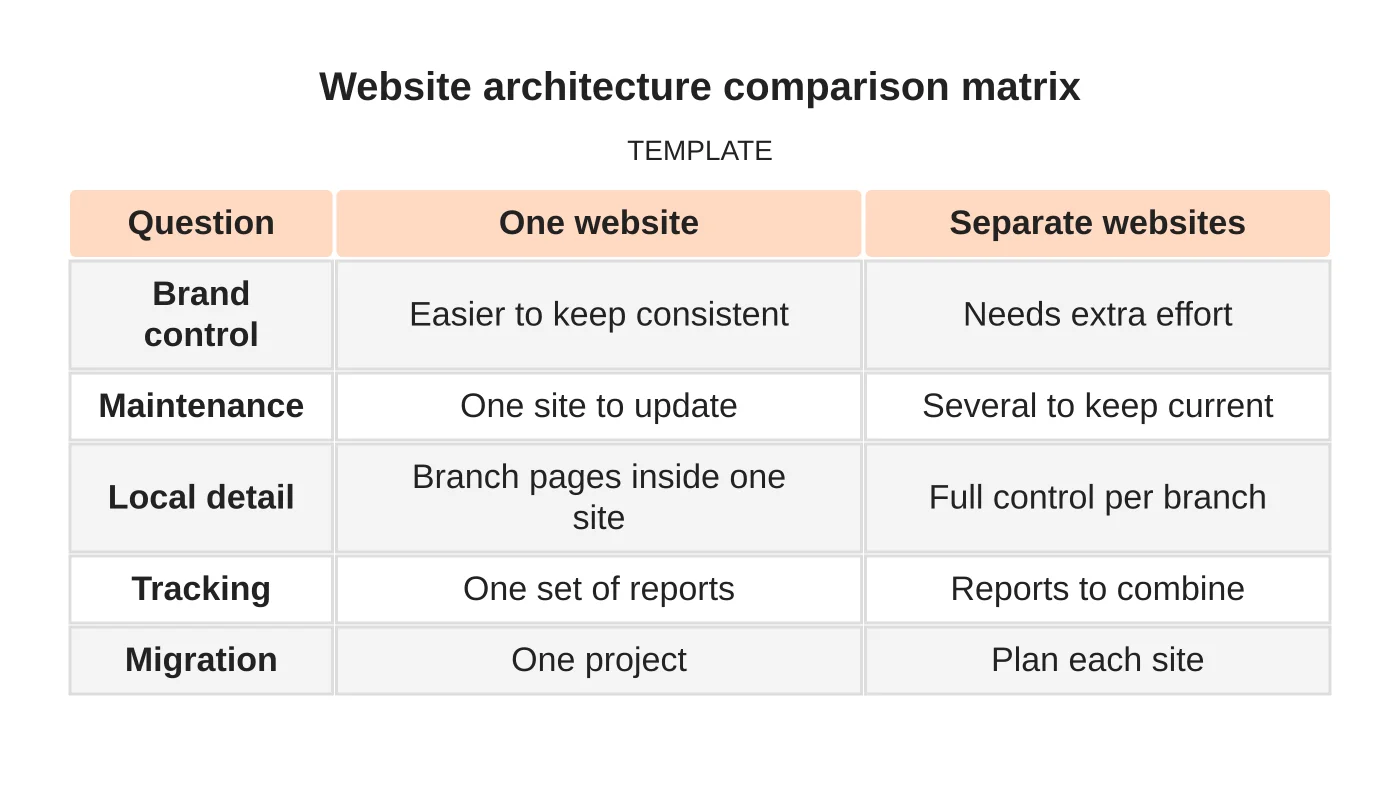
Website architecture comparison matrix
| Question | One website | Separate websites |
|---|---|---|
| Brand control | Easier to keep consistent | Needs extra effort |
| Maintenance | One site to update | Several to keep current |
| Local detail | Branch pages inside one site | Full control per branch |
| Tracking | One set of reports | Reports to combine |
| Migration | One project | Plan each site |
Common mistakes
- Choosing separate sites without anyone to maintain them.
- Merging sites without a redirect plan.
- Ignoring how customers actually search.
- Losing branch-level tracking after a change.
- Deciding once and never reviewing.
Questions multi-location businesses ask
Is one website always better? Not always. It is often simpler to keep accurate, but ownership or brand structure can point the other way.
Do separate sites rank better locally? There is no guarantee either way. Accurate, distinct local information matters more than the structure.
See the multi-location strategy guide and branch pages that route enquiries correctly.
Next step
Discuss your target customers, service area and lead-generation priorities with Web Design Davao. Read about our digital marketing service or contact us.
Frequently asked questions
Is one website always better for multiple branches?
Not always. One site is often simpler to keep accurate, with one set of updates, security checks and backups. But ownership or brand structure, such as separately owned branches trading under different names, can point the other way.
Do separate websites rank better locally?
Neither structure is certain to do better. Accurate, distinct local information matters more than the structure. Check current official search guidance before changing structure, and make no assumption about rankings or enquiries either way.
Will I still see enquiries by branch if I merge sites?
You can, if you plan for it. A single site can record the branch for each enquiry, while separate sites need their reports combined. Check that tracking will still show enquiries by branch before you choose a structure.
Sources and notes
Last updated 21 November 2026. This guide is general information based on Web Design Davao’s web design and digital marketing practice. It cites no statistics and makes no promise about rankings, enquiries or contracts. Web Design Davao is not licensed or certified in this industry, so check technical, safety, legal and regulatory matters with a suitably qualified professional. Examples are templates or illustrations, not client results.


