

Quick answer
Electrical service pages work better when they start from the homeowner’s words, such as lights flicker or the breaker keeps tripping, and end in the right enquiry. Explain scope in plain language, state how you quote, collect safe information and route technical or urgent questions to qualified electricians. Have a licensed electrician review all technical content.
- Open each page with the homeowner’s problem in everyday words, then give the technical term in brackets.
- Never ask customers to open panels, remove covers or test anything, and add a note not to attempt electrical work.
- Decide in advance who reads quote requests, what triggers a call from a qualified person and what happens after hours.
A homeowner rarely knows the technical name of the problem. They know “the lights flicker”, “I need more outlets” or “the breaker keeps tripping”. Service pages that start from the homeowner’s words and end in the right enquiry work better than pages full of jargon. This article is about the page design, not the electrical work: it gives no installation instructions, and all technical content must be reviewed by a licensed electrician.
1. Explain service scope in plain language
Each service page should open with the problem the homeowner is trying to solve, then explain what you do.
A simple structure:
- Heading: the customer’s problem or need in everyday words.
- What this service is: two or three short sentences.
- When you might need it: typical situations, without diagnosing.
- What happens at a visit: the steps from arrival to quote.
- What we do not do: limits, so customers do not assume.
Use the term customers search for, then the technical term in brackets. For instance, “Adding power points (outlets)”. Keep paragraphs short and avoid describing how to do the work.
2. State assessment and pricing approach
Customers worry about surprise costs. Explain honestly how pricing works.
- If you quote after an inspection, say so and what the inspection includes.
- If a call-out fee applies, state it clearly where you are able to.
- If prices vary by property, explain what affects them in general terms.
- Avoid promising a fixed price or outcome before seeing the job.
Do not publish prices you cannot stand behind, and keep any figure on the page current. A short “How we quote” section builds trust and reduces wasted enquiries.
3. Gather safe, useful information
A form can help you prepare for a visit without putting anyone at risk. Ask for:
- the type of job or problem, in the customer’s words,
- the location in the home or building,
- photographs of the area, if the customer can take them safely,
- preferred times and access arrangements.
Never ask customers to open panels, remove covers or test anything. Add a short line telling visitors not to attempt electrical work themselves and to treat anything involving sparks, burning smells or water near electrics as urgent. The wording should be approved by a qualified electrician.
4. Route technical and urgent questions to electricians
Administrative staff or form software can collect information, but they must not diagnose faults or advise on safety. Decide in advance:
- who reads quote requests and how soon they reply,
- what words or situations trigger a phone call from a qualified person,
- what happens outside working hours.
Urgent contact should work differently from the quote form, with a visible phone number and honest hours. See the residential electrician website guide for the overall structure and administrative support for electricians for the escalation workflow.
5. Show evidence on each page
Each service page should show some evidence. That could be a small, approved project example, a short note about the types of homes you have worked in, or a genuine review quoted with permission. Evidence should be specific to the service shown on the page, not a generic gallery repeated everywhere.
Homeowner service-page template
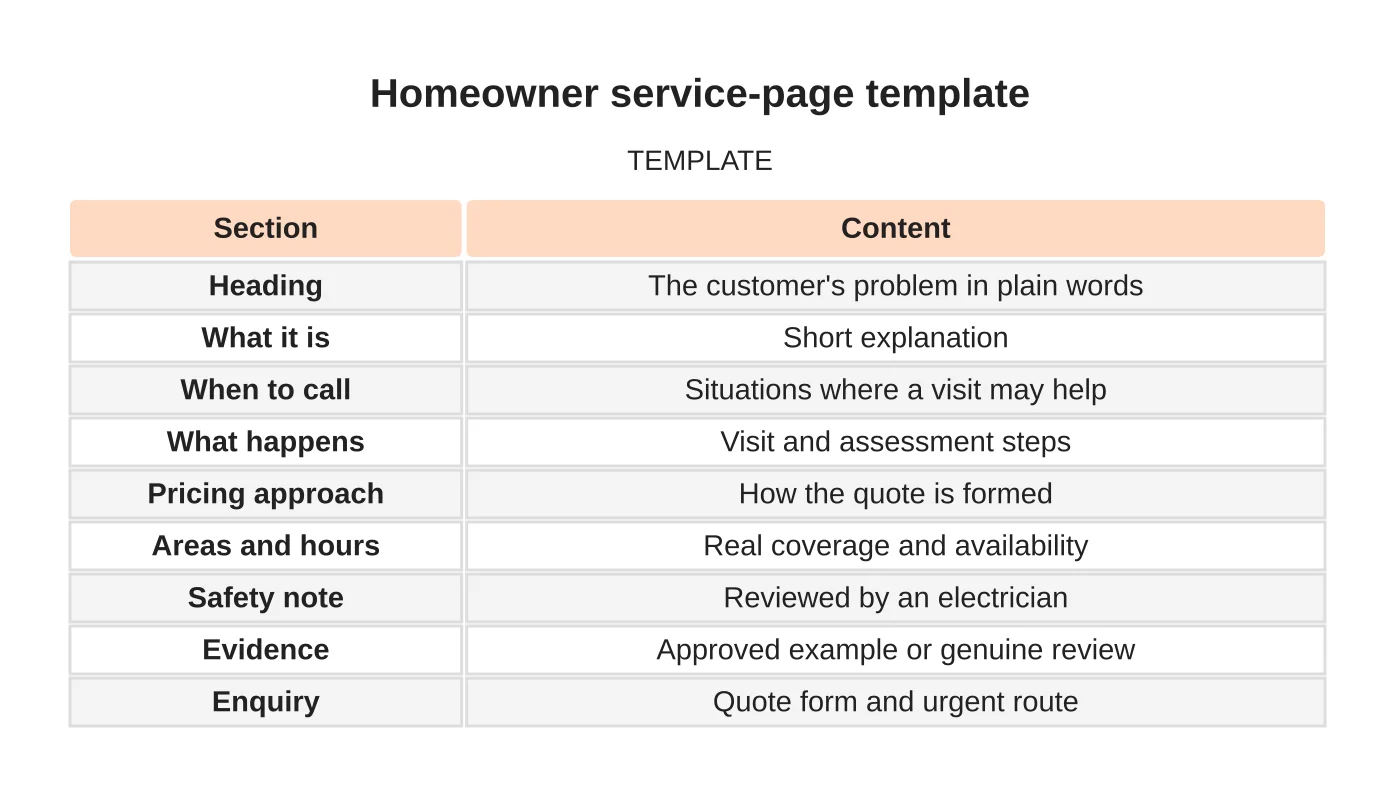
| Section | Content |
|---|---|
| Heading | The customer’s problem in plain words |
| What it is | Short explanation |
| When to call | Situations where a visit may help |
| What happens | Visit and assessment steps |
| Pricing approach | How the quote is formed |
| Areas and hours | Real coverage and availability |
| Safety note | Reviewed by an electrician |
| Evidence | Approved example or genuine review |
| Enquiry | Quote form and urgent route |
Common mistakes
- Using technical terms customers do not search for.
- Giving DIY advice or implying customers can fix faults.
- Hiding how you quote.
- Asking customers to interact with electrical equipment.
- One page for all services.
Questions electricians ask
How long should a service page be? Long enough to answer the homeowner’s questions, which for most services is a few hundred words plus the form. Avoid padding.
Should I add an FAQ? Yes, if it answers real questions you receive, such as how quotes work or what areas you cover. Do not use an FAQ to repeat the page.
Can I mention brands of equipment? Only if you are authorised and it helps the customer. Never imply an endorsement you do not have.
What about warranties? Describe any workmanship guarantee exactly as your business offers it, and have the wording checked.
Next step
Request a website review or discuss the pages and enquiry workflow your business needs. Read about our web design service or contact us.
Frequently asked questions
How should an electrical service page explain pricing?
Say honestly how pricing works: whether you quote after an inspection, whether a call-out fee applies and what affects the price in general terms. Avoid promising a fixed price before seeing the job, and keep any published figure current.
Who should handle technical or urgent questions?
Qualified electricians. Administrative staff or form software can collect information, but must not diagnose faults or advise on safety. Urgent contact should work differently from the quote form, with a visible phone number and honest hours.
Should I add an FAQ to each service page?
Yes, if it answers real questions you receive, such as how quotes work or what areas you cover. Do not use an FAQ to repeat the page. Most service pages need only a few hundred words plus the form.
Sources and notes
Last updated 21 November 2026. This guide is general information based on Web Design Davao’s web design and digital marketing practice. It cites no statistics and makes no promise about rankings, enquiries or contracts. Web Design Davao is not licensed or certified in this industry, so check technical, safety, legal and regulatory matters with a suitably qualified professional. Examples are templates or illustrations, not client results.


