
Quick answer
Give offshore accounting staff secure access by starting from the role: list the tasks, then grant only the systems and records those tasks need, through named accounts the firm creates and removes. Document permissions in a matrix, set file handling rules, separate preparers from reviewers, keep audit logs where available and run joiner, mover and leaver checks.
- Keep work inside the firm’s own systems, with no local copies, personal drives or personal email holding client data.
- Remove all access the same day someone leaves, including shared mailboxes and connected apps, and recover firm data.
- Each quarter, check a sample of accounts against the permissions matrix and test that support users cannot reach restricted clients.
Access is the part of offshore support that worries accounting partners most, and rightly. Client records include identity details, financial positions and tax information. The goal is to give each person only the access they need, record what they do and remove it promptly.
This guide covers role-scoped permissions, file handling, reviewer access, audit trails and joiner-mover-leaver checks. It is general guidance, not legal advice. This is general information, not legal advice. Check your situation with a qualified adviser. See offshore staffing for accounting firms.
Start from the role, not the person
Write the tasks the role will do, then the systems and records they need for those tasks. Everything else is out of scope. A person who prepares entries for assigned clients does not need access to every client or to firm administration. Keep the firm in control of accounts: named user accounts in your systems, created and removed by your administrator.
Read next: Why Australian SMEs Are Hiring Offshore Bookkeeping Assistants Instead of Expanding Payroll.
Use a permissions matrix
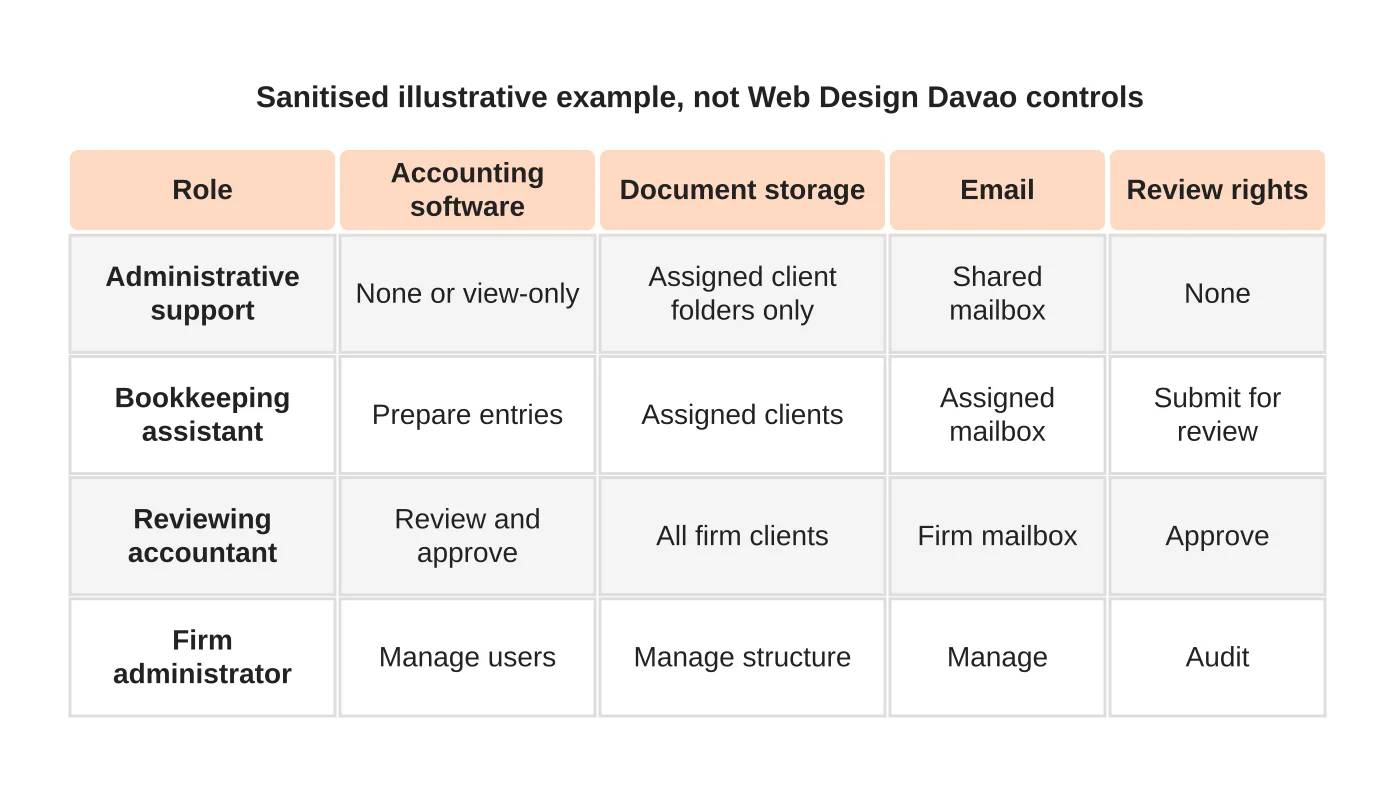
Document, per role, what is allowed in accounting software, document storage and email, and what rights exist to review or approve. The matrix above is an illustration. Review it with the partner who is accountable for the client data, and update it when roles change.
Related reading: How US Accounting Firms Can Grow Profit Margins with Offshore Filipino Teams.
Approve file handling
Decide where files may live and how they move. Typical rules include:
- Work inside the firm’s own systems, not on personal drives or accounts.
- No local copies, downloads or screen captures unless approved.
- No client data in messaging apps or personal email.
- Approved devices and secure connections only.
State the rules in writing, with the consequence of breaking them. See combining office access controls with client system permissions for how physical and system controls combine.
Reviewer access and audit trails
The person who prepares work should not be the person who approves it. Give reviewers rights that match their role, and keep logs of who accessed or changed what, where your systems provide it. Check what logging each tool offers and how long it keeps records. Do not assume logs exist. Review them on a schedule and after any incident.
Joiner, mover, leaver checks
- Joiner: create accounts on the day of start, with the minimum role, multi-factor authentication enabled where supported and policies acknowledged.
- Mover: when the role changes, review access and remove what is no longer needed.
- Leaver: remove all access the same day, including shared mailboxes and connected apps, and recover any firm data.
Keep a checklist, sign it off and file it. See a role-based access checklist for a general version, and staged access for technicians for a parallel approach.
Test and review
Once a quarter, check a sample of accounts against the matrix. Test that a support user cannot reach a client they should not see. Record the result and fix gaps.
Frequently asked questions
What access should an offshore accountant have?
Only what the role’s tasks need. A person who prepares entries for assigned clients does not need every client or firm administration. Use named user accounts created and removed by your administrator, and document the rules in a permissions matrix.
Should the preparer also approve the work?
No. The person who prepares work should not be the person who approves it. Give reviewers rights that match their role, and keep logs of who accessed or changed what, where your systems provide it.
What should happen when staff change role or leave?
When a role changes, review access and remove what is no longer needed. When someone leaves, remove all access the same day, including shared mailboxes and connected apps, and recover any firm data. Keep a signed-off checklist.
Sources
- APP 8: cross-border disclosure of personal information, OAIC
- Data Privacy Act of 2012, National Privacy Commission (Philippines)
Talk through the role
Share the support tasks, systems, working hours and reviewer responsibilities your firm needs covered. Learn about our outsourced staffing service or get in touch.


