
Quick answer
A clinic appointment form should help the front desk call back with a time, not collect a medical questionnaire. Ask for name, mobile number, preferred contact method, service wanted, two preferred times and consent to be contacted. Leave out symptoms, diagnoses, medications, ID numbers and payment details, and warn people not to include health details.
- Say the confirmation is a request, not a booking, if true, and tell people to seek emergency care for emergencies.
- Decide who checks the inbox, how often, and what to say, and log each outcome.
- Limit who can see submissions, delete them on a schedule and never send them to a shared personal email account.
A request form should help the front desk call back with a time. It should not become a medical questionnaire. This guide covers what to ask, what to leave out and how to handle the handover. It is a design guide and not legal certification of compliance.
Request or booking?
A request form says “we will contact you to confirm”. A booking system shows live availability and confirms immediately. For many clinics a request form is simpler and safer, because scheduling depends on the practitioner, the room and the service. Be clear on the page which one you offer. See online booking tools for service businesses if you are considering a booking system.
Read next: How to Structure Clinic Service Pages for Clearer Appointment Enquiries.
What to ask
Keep the form short. Ask only what staff need to reply.
- Full name.
- Mobile number, and optionally an email address.
- Preferred contact method.
- Service wanted, from a list written in patient language.
- Preferred days and times, two options.
- Whether you are a new or returning patient, if it changes the process.
- A short note, with a warning not to include health details.
- Consent to be contacted, with a link to your privacy notice.
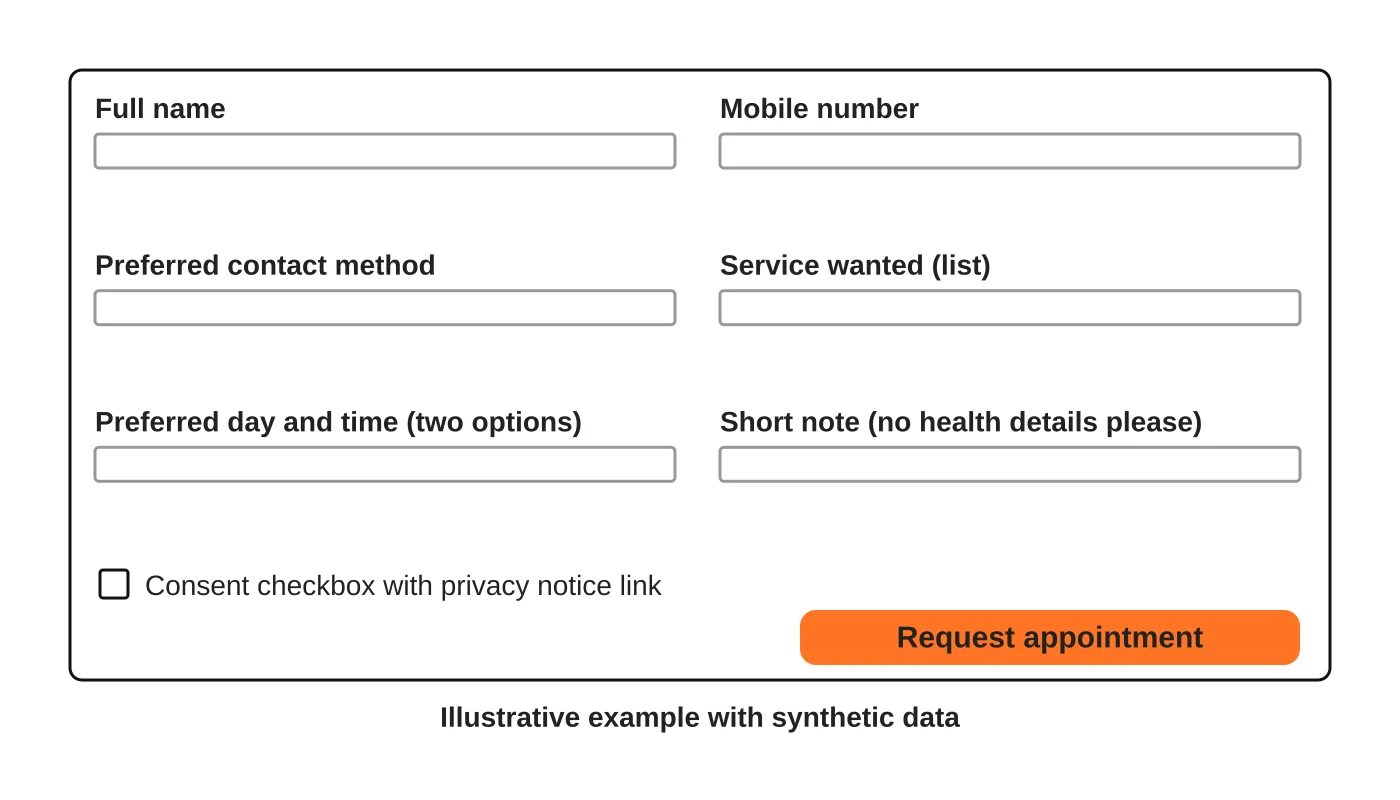
The wireframe uses synthetic information and is illustrative.
What to leave out
- Symptoms, diagnoses, medications and test results. Take these in person, or through a system designed for clinical records and agreed with your data protection lead.
- Government ID numbers, payment card details and bank details.
- Information about other people unless needed, such as a parent booking for a child.
- Optional questions that feel intrusive.
Health information is sensitive personal information, so the less your website collects, the lower the risk. See the Data Privacy Act checklist for websites. This is general information, not legal advice. Check your situation with a qualified adviser.
Confirmation and rescheduling
After submission, show a message and send an automatic reply that says:
- This is a request, not a confirmed appointment, if that is true.
- When to expect a reply, only if you can meet it.
- What to do if urgent. Include a phone number and a line telling people to seek emergency care for emergencies rather than using the form.
- How to change or cancel.
Test that the confirmation arrives on a phone.
The receptionist workflow
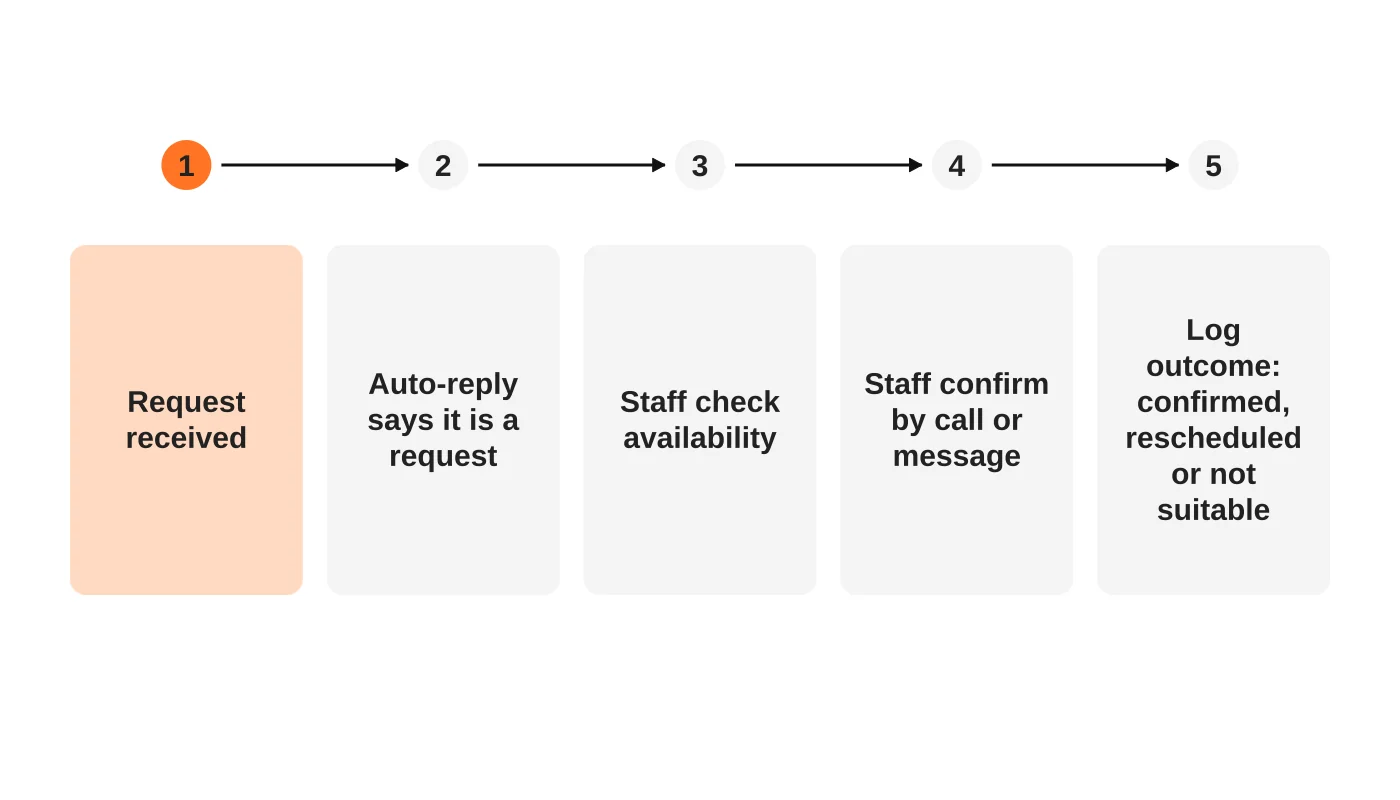
A good form fails if nobody owns the replies. Decide who checks the inbox, how often and what to say. Use a template for confirmations. Log each outcome: confirmed, rescheduled or not suitable. That log is the data you need to improve. See turning website analytics into decisions.
Protect the form
- Use a reputable form tool and keep the site updated. See what a maintenance plan should include.
- Add spam protection that does not block real patients.
- Limit who can see submissions, and delete them on a schedule.
- Do not send submissions to a shared personal email account.
- Do not put patient details in analytics events.
Test it like a patient
On a phone, fill in the form with test information, check the confirmation, then see what staff receive. Ask someone who has never seen the page to try it. Make sure the form works with a keyboard and a screen reader. See accessibility basics.
Read next: The Ultimate Medical Clinic Website Checklist: How to Build Patient Trust Online.
Frequently asked questions
Should I ask for the reason for the visit?
A service choice from a list is usually enough. Leave detail for the conversation.
Do I need a CAPTCHA?
Only if spam is a problem, and choose one that works for people with disabilities. Consider simpler spam filters first.
Can I use Messenger instead of a form?
You can offer it as an option. Make sure staff know it is not a secure channel for health details.
How fast should we reply?
As fast as you can reliably do. Do not promise what you cannot deliver.
Sources
Simplify your enquiry process
Web Design Davao’s web design team can discuss a simpler appointment enquiry process for your clinic. Get in touch.


