
Quick answer
An accounting firm website must answer what you do, why to trust you and how to start. Check that the home page states who you help, each service has its own page, credentials can be verified, the process is explained and a consultation form is easy to find. Score one point per clearly true item across 15 points.
- Fix contact and the form first, then services and scope, then trust, then speed and access.
- Warn people not to send sensitive documents through the form, and link to a privacy notice.
- Use testimonials only if they follow your professional rules and have permission, and show credentials that can be checked.
A prospective client visits your website to answer three questions: what do you do, can I trust you and how do I start. This checklist helps an accounting or bookkeeping firm check that the site answers all three.
It is a website guide, not accounting, tax or legal advice. For the wider plan, see digital marketing for Davao accounting firms.
How to score
Open your site on a phone. Give one point per clearly true item. A “partly” scores zero.
Read next: Website Development: What You Need to Know Before You Begin.
The 15 points
What you do
- The home page says who you help and with what, in plain words.
- Each main service has its own page. See how to structure accountant service pages.
- Each service says who it suits and what is included.
- It states what you do not do.
- It uses terms clients use, not only professional jargon.
Why trust you
- Credentials and registrations are shown and can be verified.
- Named professionals have short profiles.
- The process is explained: first meeting, what you need from the client, timelines and communication.
- The site explains how client information is kept confidential.
- Testimonials, if used, follow your professional rules and have permission. This is general information, not legal advice. Check your situation with a qualified adviser.
How to start
- A consultation request form is easy to find on every page. See online booking and enquiry tools.
- Phone, email and address are clear and match your Business Profile.
- The form warns people not to send sensitive documents and links to a privacy notice. See the Data Privacy Act checklist.
- It says what happens after submitting and when you reply.
- The site loads fast and works on a phone. See website speed and accessibility basics.
An annotated home page
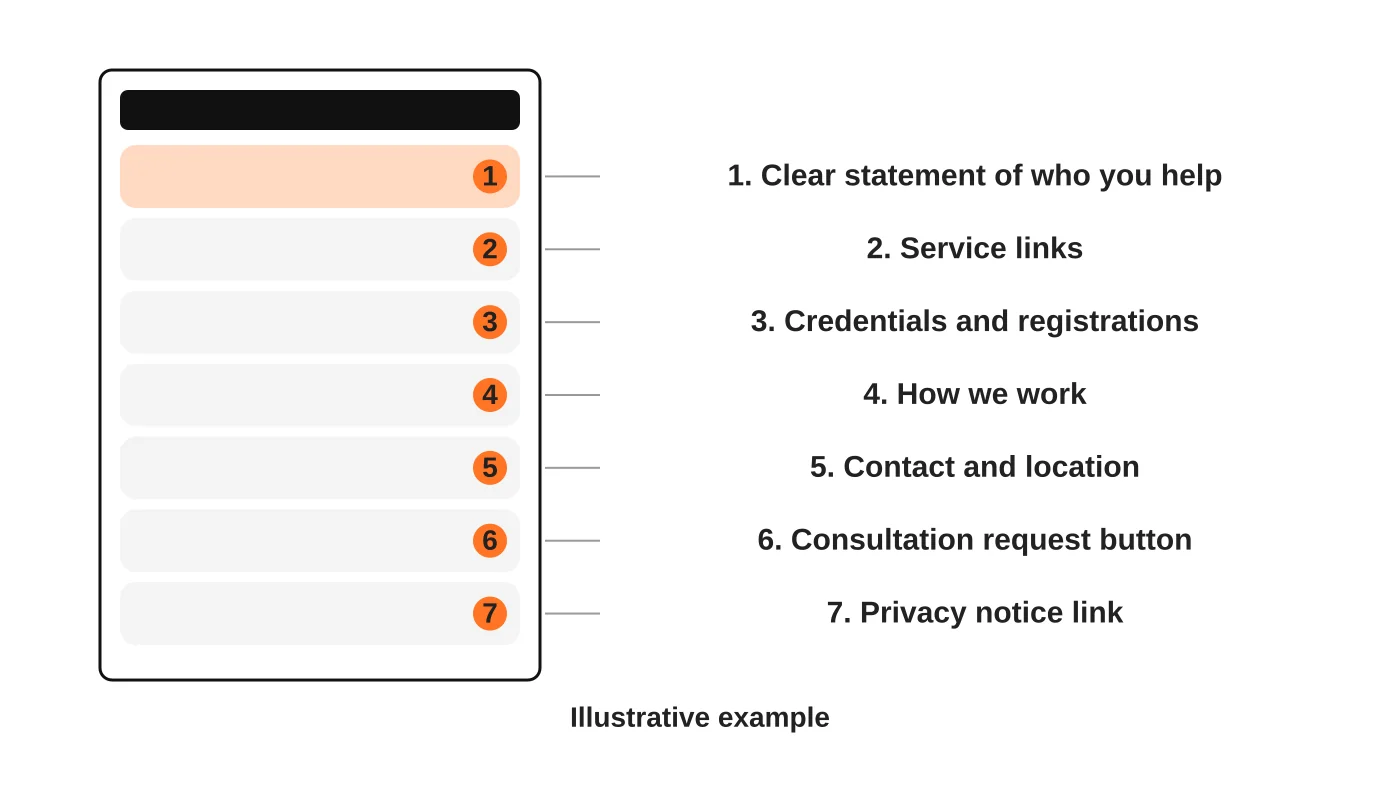
The wireframe is illustrative. The first screen should answer the three questions without scrolling.
Score yourself
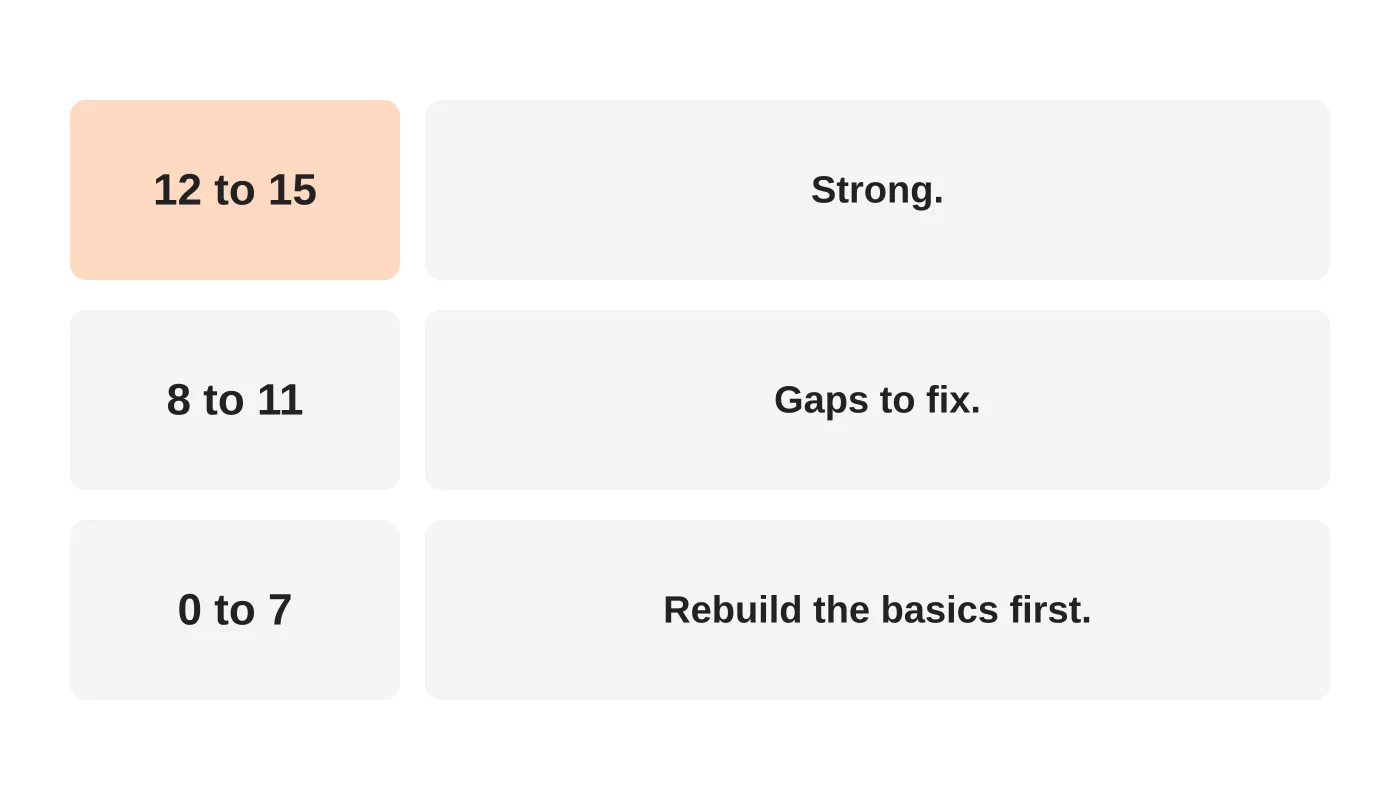
- 12 to 15: strong. Review each quarter.
- 8 to 11: fix gaps, starting with credentials and contact.
- 0 to 7: rebuild the basics before marketing.
What to fix first
- Contact and form (items 11 to 14), since they affect every visitor.
- Services and scope (items 1 to 5).
- Trust (items 6 to 10).
- Speed and access (item 15).
Common mistakes
- A list of services with no detail.
- Credentials that cannot be checked.
- Stock photos of generic offices in place of real people and places.
- Out-of-date tax or regulatory statements. Date and review them, or remove them.
- No answer to “how much?” Even a “what affects fees” explanation helps.
See website positioning and proof for deeper guidance.
Frequently asked questions
Do I need a blog?
Not necessarily. A useful set of service pages and an FAQ comes first. See content marketing strategies for Davao businesses.
Can I show client names?
Only with written permission, and consider confidentiality carefully.
Should I list fees?
Check your professional rules. If you cannot list fees, explain how you quote.
Do I need a client portal?
Only if you can secure it and support it. Do not collect sensitive files through a general form.
Sources
Review your firm’s website
Web Design Davao’s web design team can review your firm’s website against this checklist. Ask for a review.


