Quick answer
To offboard a freelancer or virtual assistant safely, work from an access register: revoke access at the agreed time (before telling them in a hostile exit), rotate every credential they could see, collect handover notes, and confirm in writing that business data is returned or deleted. Review logs the next day and audit access at day 30.
- Build for a clean exit from day one: individual logins, least privilege, a shared password manager and business-owned key accounts.
- For a difficult exit, take a backup first, revoke access, then tell them, and preserve logs and messages as evidence.
- Put confidentiality, data handling and work ownership terms in the contract, and get legal advice for cross-border personal data.
The freelancer or virtual assistant you stop working with still holds something valuable: access. Left unchecked, that access can mean deleted files, locked-out accounts or customer data in the wrong hands. In most cases the person is not malicious. A forgotten login is enough for harm to happen.
This guide gives you a practical offboarding process, from before day one to the weeks after the exit.
Why offboarding is where most security gaps open
People join with a flurry of setup and leave with almost none. Accounts are created in a hurry, logins are shared in chat, and nobody writes down where the person has access. When they go, no one is sure what to switch off.
Two risks follow. The first is accidental: an old login is still active months later and gets compromised. The second is deliberate: a person who parts on bad terms uses access they should no longer have. The newsletter issues The Freelancer You Fired Could Still Destroy You and One VA Burned the Bridge. Now You’re Paying the Price. describe how a poorly handled exit can damage tools, data and client relationships.
You cannot predict which exits will go badly. A repeatable process handles all of them the same way.
Related reading: Administrative Support for Electricians: Bookings, Access Details and Quote Follow-Up.
Before day one: build for a clean exit
Offboarding is easy when onboarding was done well.
- Give each person their own login. Never share one password among several people.
- Use least privilege. Grant only the access the role needs, at the lowest level that works.
- Use a shared password manager so credentials are stored, shared and revoked in one place.
- Keep a register of access. A simple list of systems, accounts and owners that you update when anything changes.
- Sign the paperwork. A written agreement covering confidentiality, ownership of work and return of data.
- Keep ownership of key accounts. Domain, hosting, ad accounts, social pages and analytics should belong to the business, with the contractor added as a user, not the owner.
Keep accounts safe with this role-based permissions checklist for virtual assistants.
Offboarding day checklist
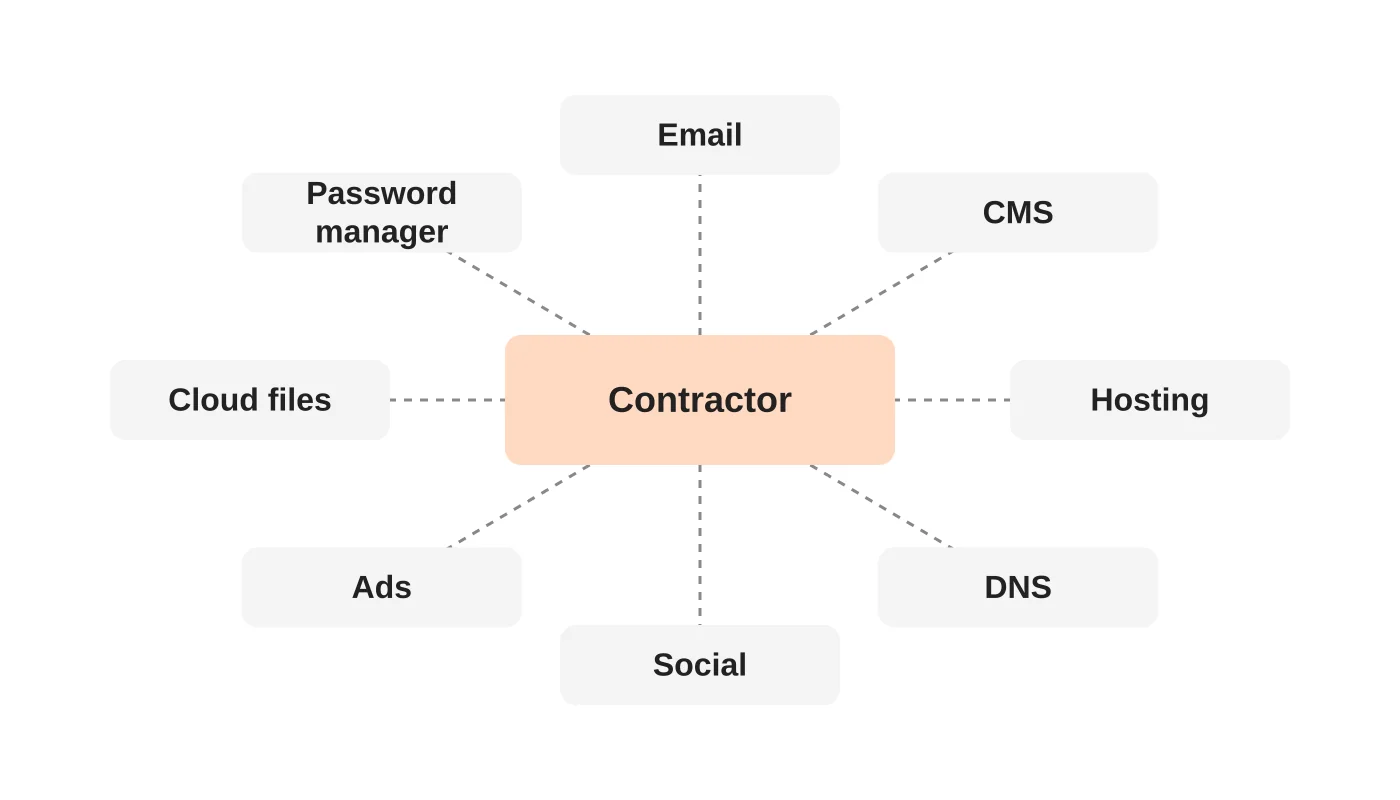
Work from your access register. If you do not have one, use the list below and note anything else the person used.
Systems to review
- [ ] Email and calendar: disable the account or remove shared mailbox access; set up forwarding if needed
- [ ] Website CMS: remove the user, or reassign their content first
- [ ] Hosting and server panels: remove users and any SSH or FTP/SFTP keys
- [ ] Domain registrar and DNS: remove access, review recent changes
- [ ] Social media accounts and scheduling tools
- [ ] Advertising and analytics accounts: Google, Meta and others
- [ ] Cloud storage and shared drives: remove access and transfer ownership of files they created
- [ ] Project, chat and CRM tools
- [ ] Password manager: remove the person and rotate every credential they could see
- [ ] Payment and invoicing tools
- [ ] Devices and software licences you provided
Handover tasks
- [ ] Collect handover notes: open tasks, passwords not held in the manager, recurring jobs and where files live
- [ ] Confirm any work in progress and who owns it
- [ ] Ask the person to confirm in writing that they have returned or deleted business data
Do these in the right order
- Decide the exit time and be ready before you tell them.
- Take a backup of key systems.
- Revoke access at the agreed time. For a difficult exit, revoke first and tell them straight afterwards.
- Rotate shared credentials.
- Check logs for recent changes.
- Confirm handover and close the agreement.
Make sure the business keeps control by checking who owns your social accounts.
After the exit: audit and rotate
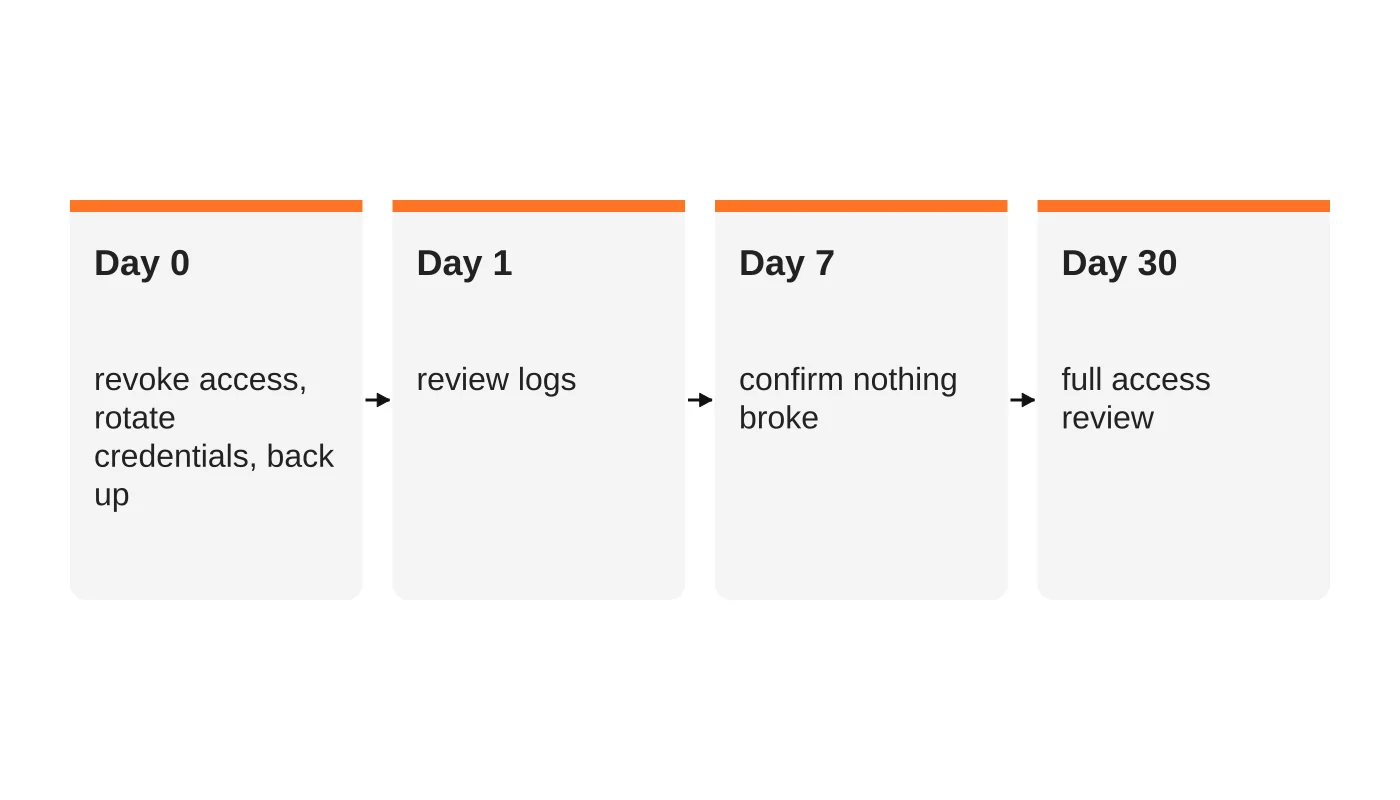
- Day 0: revoke access, rotate credentials, back up systems.
- Day 1: review audit logs and recent changes for your website, hosting, ads and email. Look for new users, forwarding rules, changed DNS records or deleted files.
- Day 7: confirm nothing has broken and that no one else is relying on the person’s old login.
- Day 30: run a full access review. Our 1-hour monthly security audit checklist includes a user-access step that catches leftovers.
Do not forget two-factor authentication. If the person’s phone was the second factor on a shared account, change that method.
Handling a hostile departure
Occasionally a freelancer leaves angry, or you need to end the relationship suddenly.
- Revoke first, discuss second. Do not warn them in advance.
- Preserve evidence. Save backups, logs and messages before making changes.
- Check for back doors. Look for accounts, scheduled tasks, forwarding rules and plugins they may have added.
- Keep the tone professional. Stick to facts and put communication in writing.
- Take advice if data is at risk. If personal data may have been taken or exposed, review your duties under the Philippine Data Privacy Act and any client contracts. What a website breach costs and what the Data Privacy Act expects sets out the timing rules at a high level.
- Treat the website as a possible incident. If you suspect tampering, see the signs your website has been hacked.
Cross-border contractors: contracts, NDAs and data
Working with people in another country does not change the principle, but it adds paperwork.
- Put confidentiality and data handling terms in the contract, including what happens to data at the end.
- State who owns the work product.
- Confirm which country’s law governs the agreement.
- Keep sensitive data in your systems, not on the contractor’s personal devices, where you can.
Get legal advice for your situation, particularly if you handle personal data of Australian, European or Philippine customers.
Downloadable offboarding template
Copy this into your own document and fill it in each time.
| Field | Entry |
|---|---|
| Person and role | |
| Last working day | |
| Reason and type of exit (planned or urgent) | |
| Systems with access (use your register) | |
| Revoked by and date | |
| Credentials rotated by and date | |
| Handover notes received | |
| Files and data returned or deleted (confirmed in writing) | |
| 24-hour log review done by | |
| 30-day access review done by |
Frequently asked questions
When should I revoke access?
At the agreed end time, and immediately for a sudden or hostile exit. Do not leave accounts open “for a few days”.
Should I delete the person’s accounts or just disable them?
Disable first, so you keep the history and can reassign files. Delete later once everything is transferred.
What if they only used a shared login?
Change that password at once and move to individual logins from now on.
Do I need an NDA for a virtual assistant?
A written confidentiality agreement is a sensible baseline whenever someone sees customer or business information.
Does a managed team change this?
A managed provider usually handles staffing changes and access removal under its own process. Ask how, and make sure the provider cannot leave you with unknown logins.
From the Wired for Growth newsletter
This checklist turns The Freelancer You Fired Could Still Destroy You from Duarne Bernhagen’s LinkedIn newsletter, Wired for Growth, into a working process. A related issue, One VA Burned the Bridge. Now You’re Paying the Price., shows what can happen when a virtual assistant leaves badly.
Managed virtual staff with access controls built in
Web Design Davao’s outsourced staffing service places managed virtual assistants with documented access, supervision and a clean exit process. See also how teams reduce operational bottlenecks in offshore virtual assistant operations and the human side of automation in why outsourced teams are the human side of AI automation. Talk to us about a safer way to bring on help.