

Quick answer
To prepare a pickleball booking website for registration surges, map every dependency, including the host, booking tool and payment provider, and estimate modest, likely and high traffic. Confirm hosting limits and upgrade options in writing, cache static content but not booking or checkout pages, and assign monitoring and contacts. No host promises uptime or speed.
- Ask your provider in writing what plan limits apply, what happens at the limit and whether you can upgrade temporarily.
- Only load test your own site, with host permission and outside busy times; third-party tools need written permission.
- Write one page naming who checks the booking flow before registration, who to call and what customers are told.
A pickleball website can be quiet for weeks and then get a spike when a tournament opens registration, a new venue launches or a popular post is shared. If the site slows or fails at that moment, you lose registrations and goodwill. This guide helps venue and event operators plan hosting. It does not promise uptime or speed. A host controls only part of the system.
1. Map the website and external booking dependencies
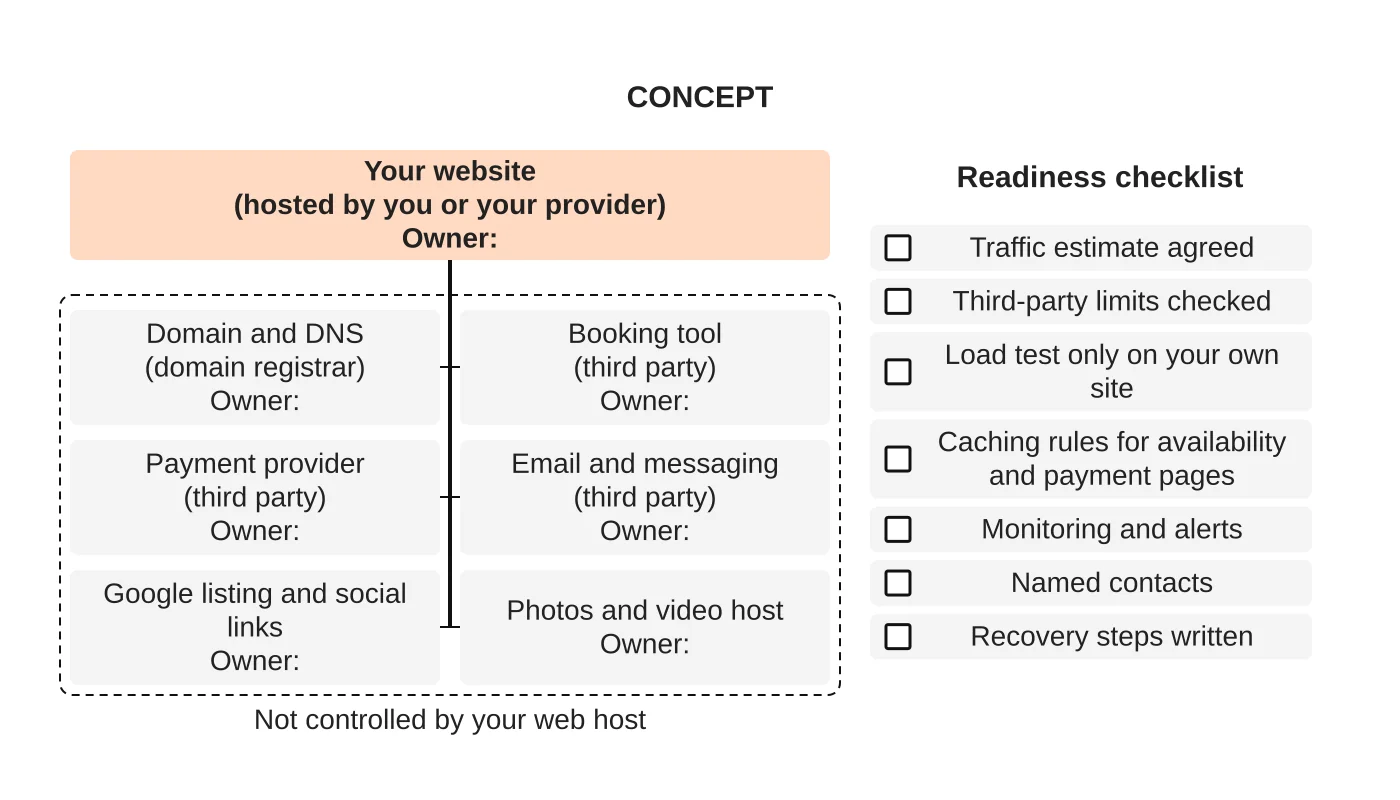
Draw what your booking journey depends on. Many venues use a website plus other services:
- domain and DNS,
- the web host,
- a booking or registration tool run by someone else,
- a payment provider,
- email or messaging for confirmations,
- Google listing and social links.
Mark which parts you or your host control and which belong to a third party. If the booking tool is down, your host cannot fix it. Knowing this changes who you call and what you tell customers.
2. Estimate launch and registration traffic
Use what you know: your mailing list size, social followers who are local, the number of players you expect and past events. Ask what time registration opens, since people arrive at once. Estimate a modest, a likely and a high case. You cannot predict exactly, so plan to cope with the high case and avoid a single point of failure. For general hosting guidance, see why secure web hosting matters.
3. Understand resource limits and safe load testing
A hosting plan has limits on processing, memory, connections and sometimes bandwidth. Ask your provider in writing:
- what the plan’s limits are and what happens when they are reached,
- whether you can temporarily upgrade for an event,
- what the process and timing for upgrades are.
If you test how the site copes, do it only against your own website, with your host’s permission and outside busy times. Do not run load tests against a third-party booking tool or payment provider without their written permission. It can breach their terms and affect other customers.
4. Handle caching around dynamic availability and payments
Caching stores a copy of a page so it loads fast. That is helpful for your homepage and photos, but dangerous for pages that show live availability, baskets, accounts or payment steps, because customers might see stale information. Make sure your configuration:
- caches static content,
- does not cache booking, cart, checkout and account pages,
- is tested after every change.
5. Plan monitoring, escalation and recovery responsibilities
Decide before the event:
- who checks the site and the booking flow in the hour before registration opens,
- what monitoring and alerts are in place and who receives them,
- who to call at the host, the booking provider and the payment provider,
- what you will tell customers if something fails, and where,
- how you restore the website from a backup and who does it. See maintaining a pickleball website.
Write this on one page and share it with everyone involved.
6. Review hosting support and limits
Ask what support is included, in what hours and by which channels, how fast the host responds and whether that is a commitment in writing. Check backup arrangements and how long recovery usually takes. Do not assume that a host’s support covers your booking tool, or that more hosting power fixes a slow third-party system. Compare answers against your readiness checklist.
Readiness checklist
- ☐ Traffic estimate agreed
- ☐ Hosting limits and upgrade path confirmed in writing
- ☐ Third-party limits checked
- ☐ Load test only on your own site, if done
- ☐ Caching rules tested for availability and payment pages
- ☐ Monitoring and alerts assigned
- ☐ Named contacts and recovery steps written
Events are a common cause of surges; see marketing a pickleball tournament. Booking system choices are covered in online bookings or Messenger. The overall plan is in how to market a pickleball court business.
Next step
Ask us to review the hosting requirements for your booking website, or see our hosting service.
Frequently asked questions
Which pages should not be cached?
Do not cache booking, cart, checkout and account pages, because customers might see stale information. Cache static content such as the homepage and photos, and test the configuration after every change.
Can my host fix a booking tool outage?
No. If the booking tool is run by someone else, your host cannot fix it. Mark which parts you or your host control and which belong to a third party, so you know who to call and what to tell customers.
What should I ask my hosting provider before an event?
Ask what the plan’s limits are and what happens when they are reached, whether you can temporarily upgrade for an event, and the process and timing for upgrades. Also ask about support hours, written response commitments, backups and recovery time.
Sources and notes
This article is based on our own hosting and web practice.


