
Quick answer
Choose between Messenger, online booking software or a hybrid by mapping your enquiry-to-booking process, setting your booking rules first and comparing staff effort, player convenience and duplicate-booking risk. A small venue with few courts may do well with Messenger and a shared calendar. A venue with many courts and peak-time pressure usually needs more structure.
- Decide session lengths, peak pricing, booking window, group size and coaching rules before choosing a tool.
- Ask in writing about total recurring cost, data export, integrations, support and what happens if the supplier stops the product.
- Pilot the new method alongside the old for two to four weeks, test failures, and keep Messenger as a fallback.
Many pickleball venues take bookings through Messenger or WhatsApp because it is free and familiar. That works until messages pile up, two people are promised the same court or a late reply loses the customer. This guide gives you a way to decide between manual, software and hybrid approaches, based on how your venue actually works.
Verify the features of any software against its current official documentation before you rely on them.
1. Map your current enquiry-to-booking process
Write down each step from first message to played session. For example: customer messages, you check availability, you reply, they ask the price, you confirm, they send proof of payment, you block the calendar. Note:
- who handles each step,
- how long it takes,
- where bookings go wrong, such as double-booking or no-shows.
You will use this map later as the basis for a pilot.
2. Compare staff effort and player convenience
| Messenger and manual | Online booking software | Hybrid | |
|---|---|---|---|
| Staff effort | High at busy times | Lower once set up | Medium |
| Player convenience | Depends on reply speed | Book at any time | Good if the form is simple |
| Double-booking risk | Higher | Lower with live availability | Medium |
| Payments | Manual proof of payment | Depends on the options you verify | Mixed |
| Setup effort | Low | Higher | Medium |
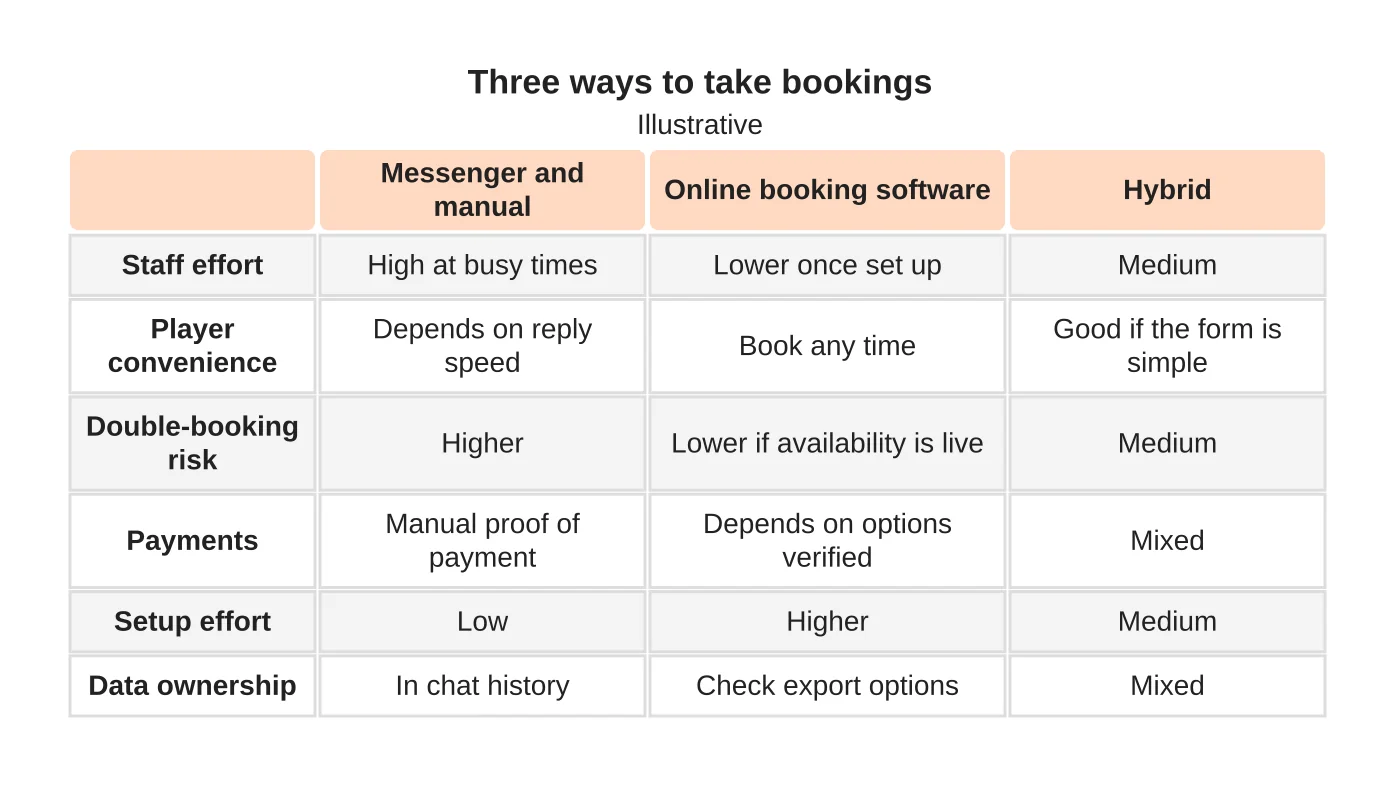
The matrix is illustrative. A small venue with few courts and regular players may do well with Messenger and a shared calendar. A venue with many courts, peak-time pressure, coaching and memberships will usually need more structure.
3. Court availability, duration and booking rules
Decide the rules before you choose a tool, so you pick software around your rules, not the other way round.
- Session lengths and whether back-to-back bookings are allowed.
- Peak and off-peak pricing.
- Booking window: how far ahead and how late.
- Group size and courts per booking.
- Separate rules for coaching, open play and private hire.
4. Payments, cancellations and duplicate-booking prevention
- Payments: list the methods your customers use, such as bank transfer, e-wallets or cards. Check which payment methods a tool actually supports in the Philippines and what fees apply.
- Cancellations and no-shows: write a short policy and make sure the system can apply it. Policy wording about refunds and liability should be reviewed by a suitably qualified person. This is general information, not legal advice. Check your situation with a qualified adviser.
- Duplicate bookings: the system must hold a court the moment it is booked. Test this with two people booking the same slot at the same time.
5. Integrations, recurring fees and data portability
Ask for answers in writing:
- What is the total recurring cost, including payment fees and add-ons?
- Can you export your customer and booking data if you leave?
- Does it connect to your website, calendar, email or messaging?
- Who supports it, and when?
- What happens if the supplier changes or stops the product?
A sample booking flow
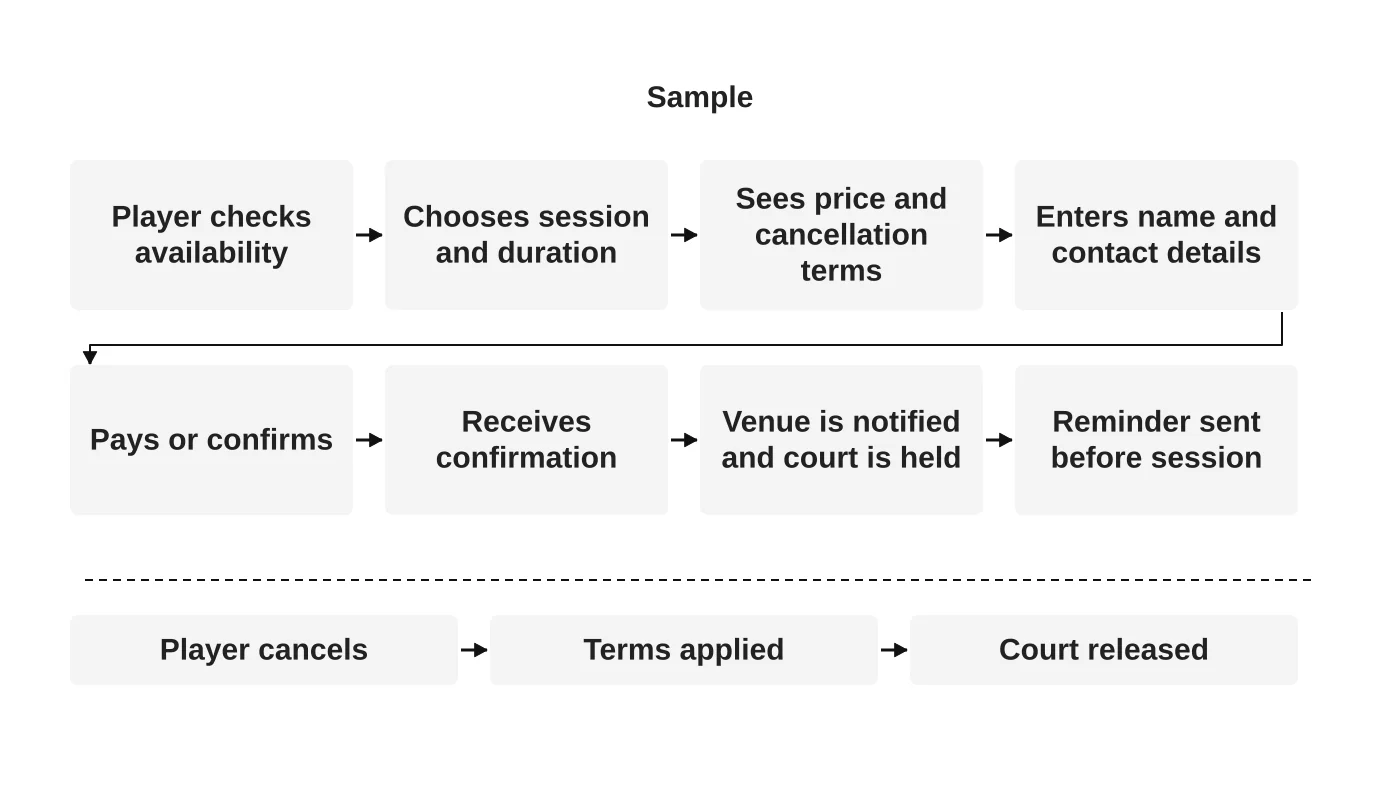
This flow is a sample. Whatever you choose, a player should be able to see availability, price and cancellation terms before they commit, and the venue should be told straight away.
6. Pilot and test before switching
- Run the new method alongside the old one for two to four weeks, with a small group of regular players.
- Test failures: a failed payment, a cancellation, a double booking attempt and a customer without a smartphone.
- Ask staff and players what was hard.
- Decide using your own numbers: time saved, bookings completed and complaints.
- Move the rest of your customers in stages and keep Messenger open as a fallback.
Booking choices affect your website too. See the pickleball court website checklist, membership websites and following up enquiries. For another sector’s perspective, read online booking tools for service businesses. The overall plan is in how to market a pickleball court business.
Next step
Share your booking workflow so we can scope suitable website and integration options. See our web design service.
Frequently asked questions
When is Messenger enough for court bookings?
A small venue with few courts and regular players may do well with Messenger and a shared calendar. It starts to fail when messages pile up, two people are promised the same court or a late reply loses the customer.
How do I test for double bookings?
The system must hold a court the moment it is booked. Test this with two people booking the same slot at the same time. Also test a failed payment, a cancellation and a customer without a smartphone before switching.
What should I check about payments?
List the methods your customers use, such as bank transfer, e-wallets or cards, then check which payment methods a tool actually supports in the Philippines and what fees apply. Verify features against current official documentation.
Sources and notes
This is a decision framework drawn from our own web design practice. No product features, fees or integrations are stated; verify them against current official documentation. The comparison matrix is illustrative.


