

Quick answer
A request-for-quote journey for wholesale customers lets buyers ask for several products with quantities in one request. Use product-aware buttons that carry the product code into a short form, send a confirmation that sets expectations, give sales a quote template and response rules, and log each outcome so you can see why quotes are won or lost.
- Do not ask for tax numbers, bank details or credit information on the quote form; handle account opening separately.
- Decide who owns the inbox, how fast to reply and what happens when you lack stock.
- Test on a phone by requesting a quote for two products, then check what the buyer and your team receive.
A wholesale buyer rarely buys a single item. They want prices for several, with quantities, terms and delivery. A request-for-quote (RFQ) journey on your website should make it easy to ask for several products at once and should give your sales team the information they need to reply fast.
This guide shows how to design one. It is a website practice guide with no performance claims. For related decisions, see catalogue website versus online store.
Map the journey
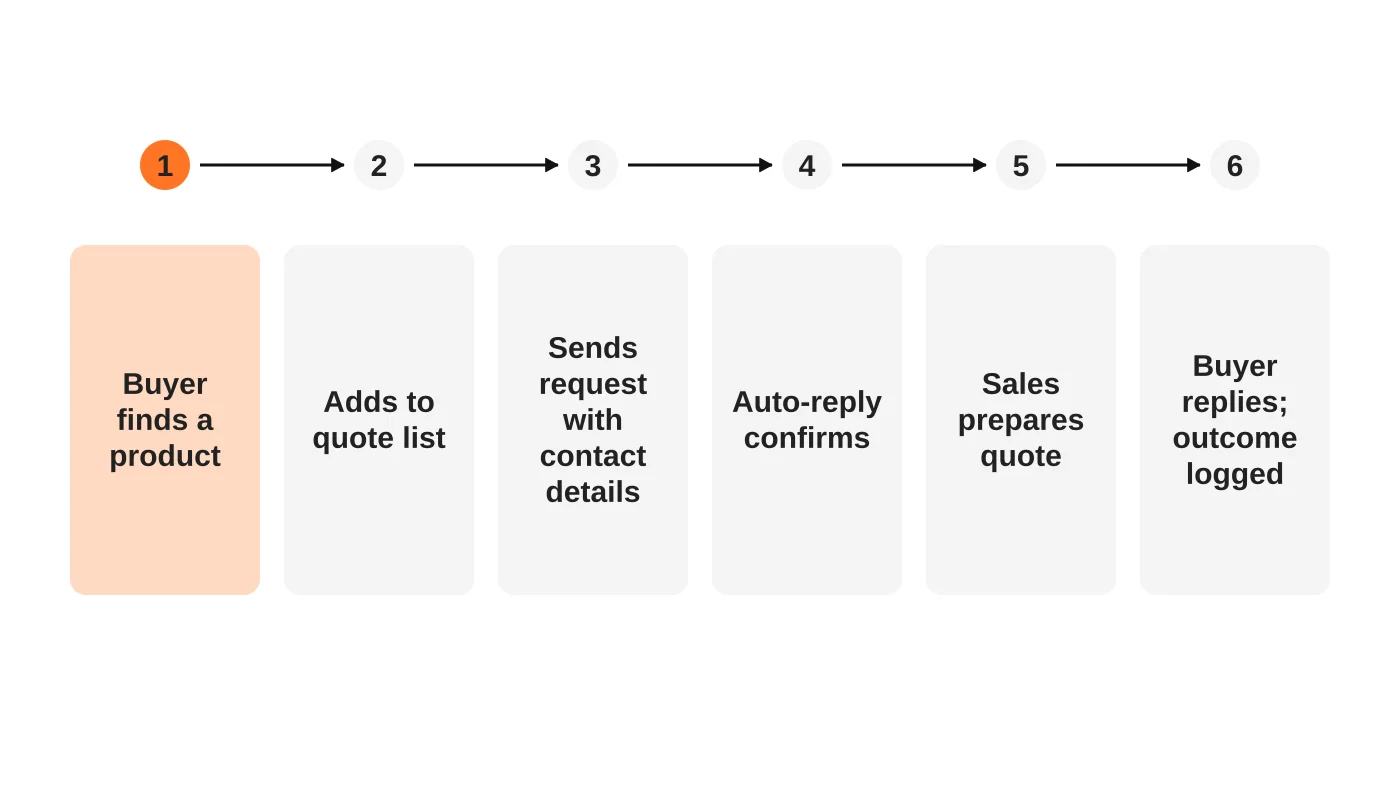
Walk through each step as a buyer and as your sales team:
- Buyer finds a product on a category or product page.
- Adds it to a quote list, or sends a single-item request.
- Sends the request with contact details and quantities.
- Receives an automatic confirmation that explains what happens next.
- Sales prepares a quote using a template.
- Buyer responds; the outcome is logged.
If you do not have a quote list feature, a single-product button with the product code attached is a good start.
Make product-aware buttons
A generic “Contact us” loses information. Use a “Request a quote” button that carries the product name and code into the form. See product pages for shoppers and AI assistants.
Keep the form short
Collect:
- Contact name, company, phone and email.
- Products and quantities, from the quote list or a field.
- Required delivery area and date, if relevant.
- Notes.
Do not ask for tax numbers, bank details or credit information on this form. Handle account opening separately and securely. See freight quote form fields for the same principle and the Data Privacy Act checklist. This is general information, not legal advice. Check your situation with a qualified adviser.
Confirm and set expectations
Show a confirmation and send an email that says:
- What was received, including the products.
- Who will reply and when, if you can meet it.
- What the buyer may need to provide, such as delivery location.
- How to reach sales urgently.
Create a quote template
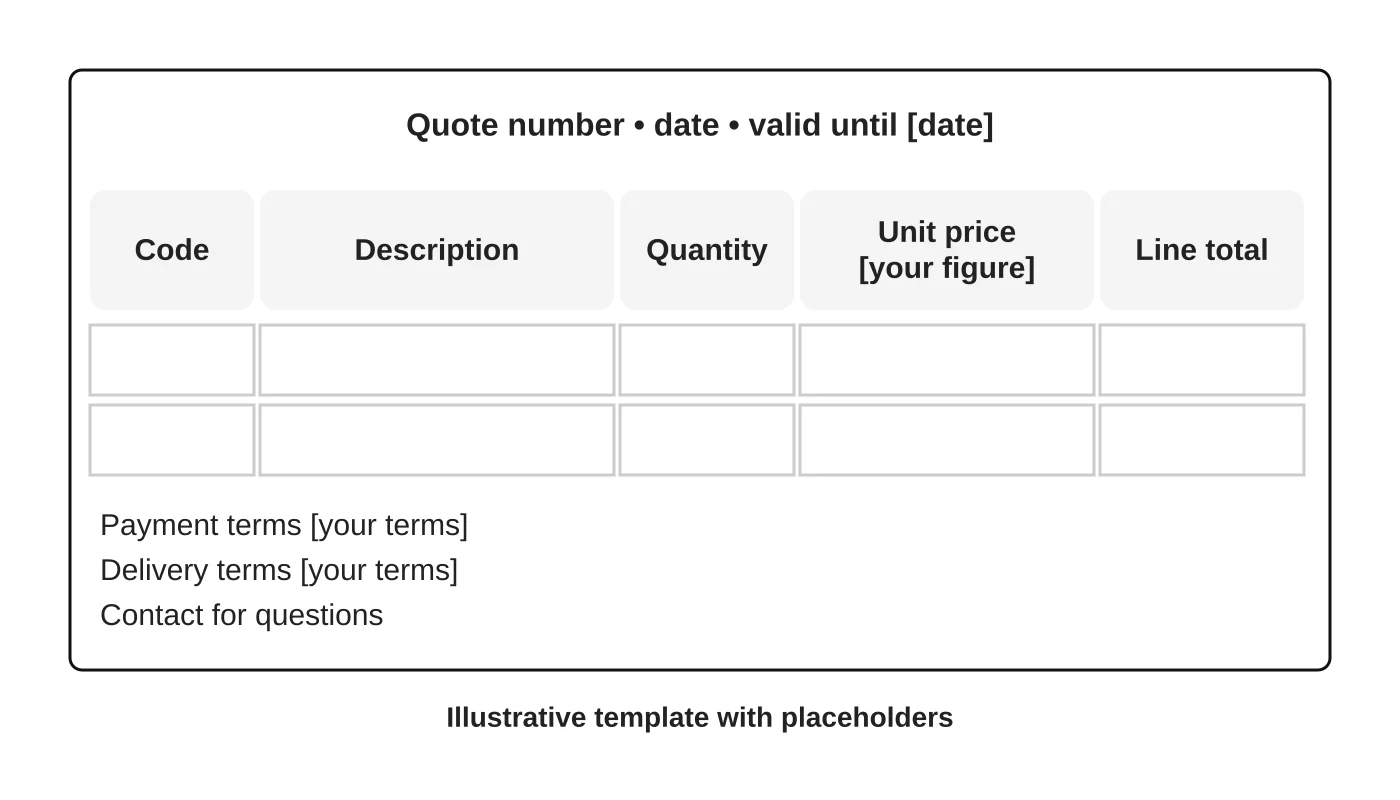
A template speeds replies and avoids mistakes. It should show a quote number, date, validity period, product codes, descriptions, quantities, unit prices, terms and contact details. The example uses placeholders only. Fill them with your real terms. Check that price, tax and delivery wording are correct.
Set response rules
Decide who owns the inbox, how fast to reply and what to do when you do not have stock. Use a shared tracker to avoid duplicated or missed requests. Log each outcome: quoted, won, lost, no response or not suitable, and why.
Handle repeat buyers
Known customers may prefer a reorder list, or a form that remembers their details. Only add this if you can maintain it securely. Otherwise, a clear reorder email address works.
Test the journey
On a phone, request a quote for two products and see what the buyer sees and what your team receives. Check the email. Fix confusing steps. See the resort website checklist, which works for any form.
Review monthly
Look at the log: how many requests, how fast you replied, how many won and why others were lost. Improve the weakest step. See digital marketing for Davao suppliers and distributors.
Frequently asked questions
Should the quote list save between visits?
It helps, but needs careful handling of data. Start simple.
Can I send quotes automatically?
Only for rule-based prices you are sure about. Otherwise a person should check.
Do I need minimum order quantities on the page?
If you have them, yes. State them.
What about price lists as PDFs?
Do not publish old ones. Date and update them. See from PDF catalogue to website.
Sources
Plan your quote journey
Web Design Davao’s web design team can discuss a quote request journey that suits your sales process. Get in touch.


