

Quick answer
To write an SOP a virtual assistant can follow, keep it to one or two pages with the same layout each time: purpose, trigger, what you need, numbered steps with one action each, decision rules, what done looks like and who to ask. Then test it with someone who does not know the task.
- Start with your top three repeated tasks, and write one action per step using the words shown on screen.
- State what the assistant decides alone, what to report afterwards and what needs approval.
- Keep SOPs in one shared place with an index, one owner each, and a review every six months.
A virtual assistant is only as effective as the instructions they receive. Your VA Can’t Read Your Mind (And Shouldn’t Have To) makes the point that your assistant cannot read your mind, and Why You Should Build for 3 People, Even If You Have 30 suggests designing for a small number of people even when there are more. The tool that makes both possible is the humble standard operating procedure, or SOP.
An SOP is a written set of steps for doing a task the same way each time. This guide shows how to write ones that a new assistant can follow without calling you.
Why SOPs matter
- They move knowledge out of your head. The task no longer depends on you being available.
- They make quality consistent. The tenth invoice is done like the first.
- They shorten onboarding. A new assistant starts with a guide, not guesswork.
- They protect you if someone leaves. See the offboarding checklist.
- They show you where work is messy. Writing a step you cannot explain tells you the process needs fixing.
Pick the right tasks first
Do not document everything. Start with tasks that are repeated often, take real time and can be written as steps. The owner bottleneck audit gives a ranked list. Write SOPs for your top three before anything else.
Plan ahead for leave and illness with backup coverage for your virtual assistant.
The anatomy of a good SOP
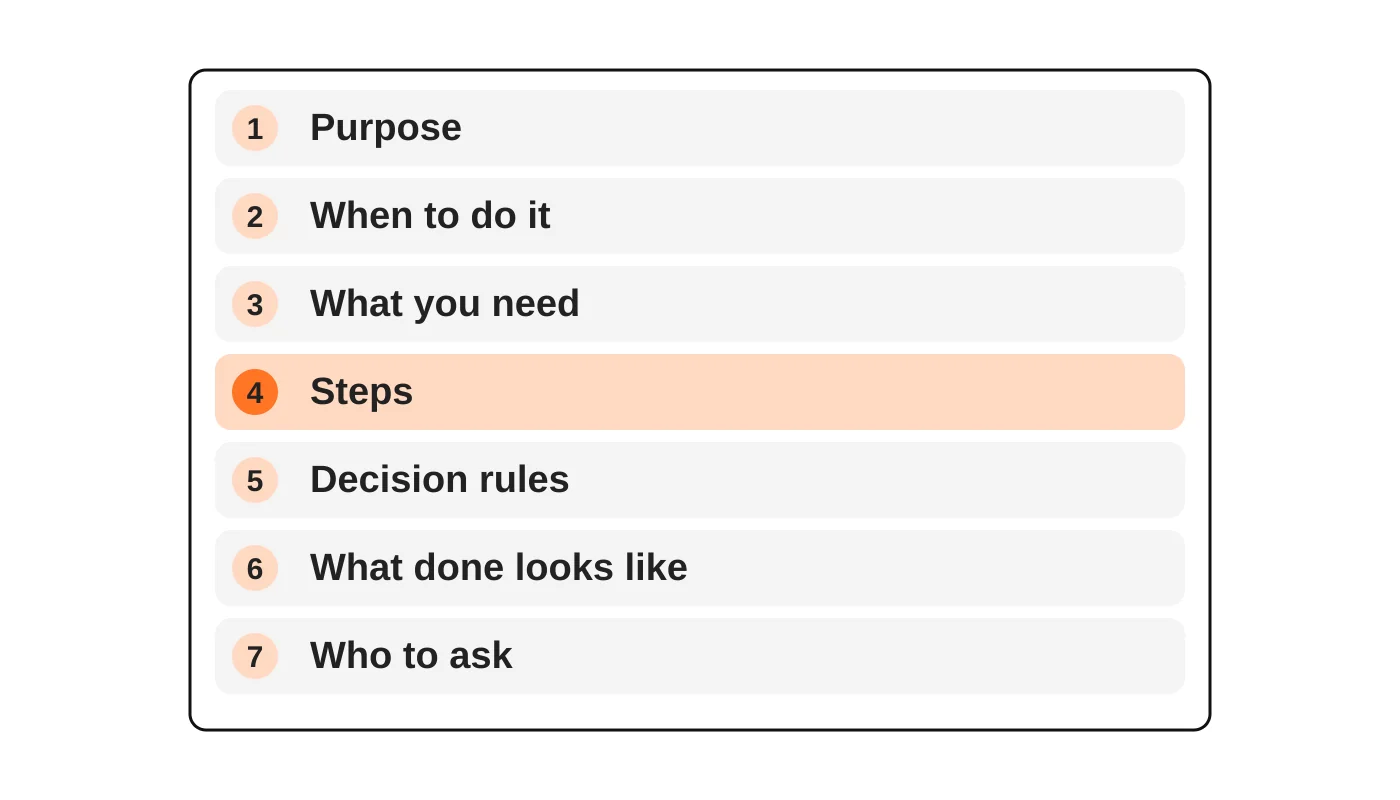
Keep each SOP to one or two pages. Use the same layout each time.
- Purpose. One sentence: why this task exists and who it serves.
- When to do it. The trigger or schedule: “every Monday” or “when a new enquiry arrives”.
- What you need. Logins (by role, not password), files, templates and where to find them.
- Steps. Numbered, in order, one action per step.
- Decision rules. What to do when something is unusual: “if the invoice is over PHP 50,000, ask [name]”.
- What done looks like. How the assistant knows they are finished, and what to report.
- Who to ask. A name and the best way to reach them.
Write steps people can follow
- One action per step. “Open the shared drive and find the Invoices folder” is two actions. Split it.
- Use the words on the screen. Name the buttons and fields as they appear.
- Add a screenshot or a short screen recording for anything involving software. A two-minute recording often replaces a page of text.
- Give examples, both a good result and a poor one.
- State the standard: “reply within one working day, in a friendly, brief tone”.
- Avoid assumptions. “Send it to the client” leaves out which email address, which template and which subject line.
Decide what the assistant decides
The biggest gap in most SOPs is not the steps. It is the decisions. State clearly what the assistant may decide alone, what they should tell you about afterwards and what needs your approval. How to delegate to a virtual assistant describes ownership levels that you can attach to each task.
To judge performance fairly, use a virtual assistant KPI scorecard.
Handle security and access
Never put passwords in an SOP. Describe the access needed and use a password manager or sharing tool. Give each assistant the least access they need. If your SOPs touch customer information, check the rules in the Data Privacy Act checklist and the one-page AI use policy for AI tools.
If your assistant speaks to clients, agree what to answer and when to escalate.
Test it
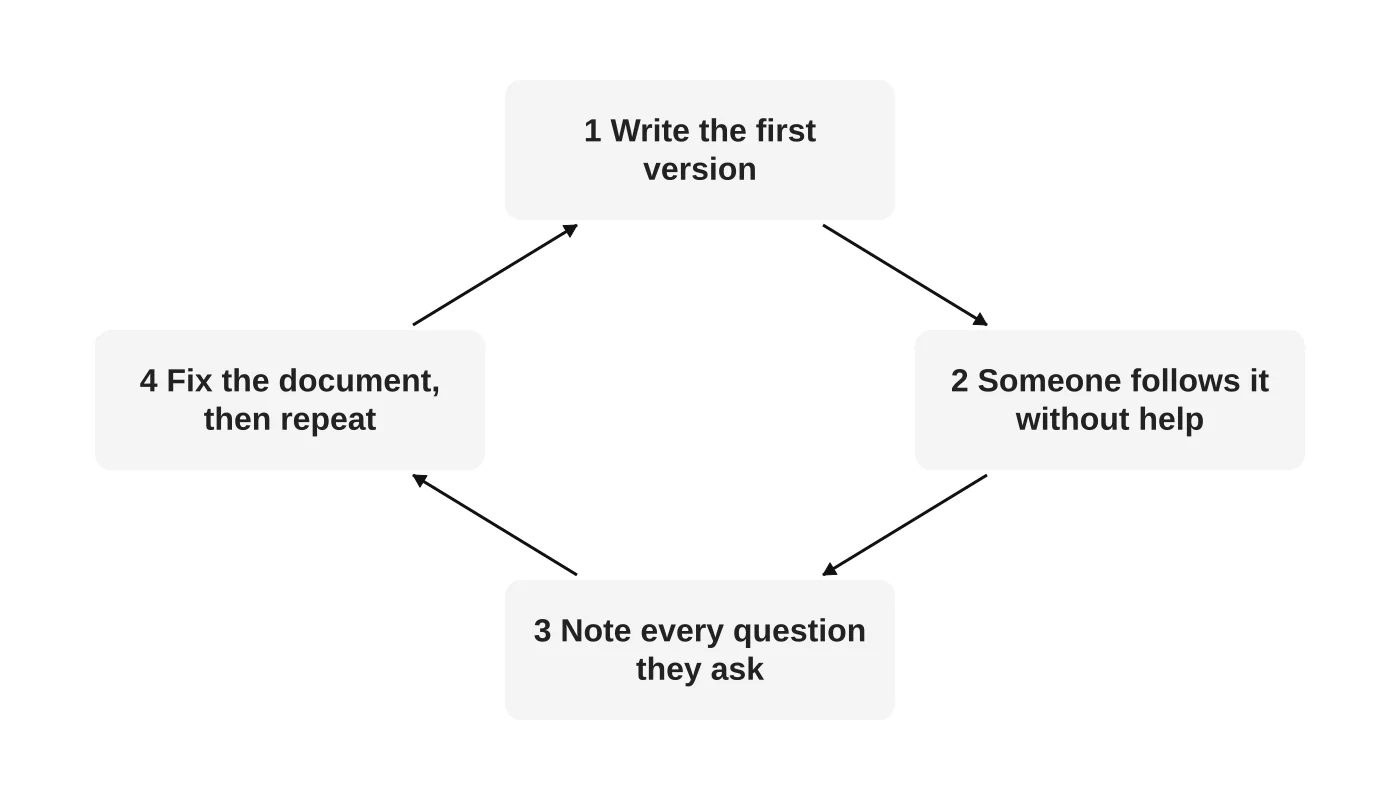
A SOP is a draft until someone has used it. Hand it to a person who does not know the task, ask them to follow it without help and write down every question. Each question marks a missing step. Fix the document and repeat until the questions stop.
The first version will be imperfect. That is normal.
Where to keep them
- One shared place with clear folder names, such as a shared drive or a knowledge base.
- An index listing each SOP, its owner and its last review date.
- A review date. Revisit each SOP every six months, or after a tool changes.
- One owner per SOP, who is responsible for keeping it correct.
A simple SOP example
Task: Send a quote follow-up.
- Purpose: Keep quotes from going cold.
- When: Three working days after a quote is sent with no reply.
- Need: Access to the quote tracker and the follow-up email template.
- Steps: 1. Open the quote tracker. 2. Filter for quotes sent three working days ago with no reply. 3. Open the follow-up template. 4. Add the client’s name and quote number. 5. Send. 6. Mark “followed up” and add the date.
- Decision rule: If the quote is over [AMOUNT], tell [NAME] before sending.
- Done: Tracker updated; list sent to [NAME] on Friday.
- Ask: [NAME] in the team chat.
Frequently asked questions
How long should an SOP be?
As short as it can be while still being followable, usually one to two pages.
Should I record videos instead?
Often a short video plus a numbered list works best. Videos alone are hard to update and search.
Who should write them?
The person who does the task best, ideally with the person who will do it next, who tests it.
Can AI write SOPs?
AI can turn rough notes into a draft. A person must check it against the real task. See using AI as a marketing assistant for what to hand over and what to keep.
How many SOPs do I need?
Start with three. Add more when you hand over new tasks.
From the Wired for Growth newsletter
This guide builds on Your VA Can’t Read Your Mind (And Shouldn’t Have To) and Why You Should Build for 3 People, Even If You Have 30 from Duarne Bernhagen’s LinkedIn newsletter, Wired for Growth.
Start with your top three
Web Design Davao’s virtual staffing team can help you document your first tasks and onboard a trained assistant. Book a call.


