

Quick answer
A pickleball court website should answer where the venue is, when it is open, what it costs, whether to book and how to cancel, within seconds on a phone. Show court details, clearly labelled prices for open play, private hire, coaching and memberships, a mobile booking path, location, contact details and a plain cancellation policy.
- Show prices in Philippine pesos with what is included, and do not hide them behind a contact form.
- Test the path from homepage to confirmed booking on a real phone, checking the price appears before details.
- Ask three people who have never visited to find the price and book a slot without help.
Before a customer books a court, they need to know where it is, what it costs, when it is free and how to secure a slot. A good pickleball venue website answers those questions in seconds on a phone. This checklist covers the information and structure to plan before you build or redesign. Choosing booking software is a separate decision, covered in online bookings or Messenger.
What visitors need before they book
Most visitors are asking the same short list of questions:
- Where is it and how do I get there?
- Which days and hours are you open?
- How much does it cost, and for how long?
- Can I turn up or must I book?
- What should I bring, and can I hire equipment?
- What happens if I need to cancel?
If your homepage does not answer these without scrolling through a long page, you will lose visitors to the venue that does.
Related reading: Selling Pickleball Equipment Online: A Website Guide for Philippine Retailers.
Court details, photos and amenities
- Number and type of courts, and whether they are indoor, covered or outdoor.
- Surface and lighting only as you can state them accurately.
- Amenities such as parking, changing rooms, seating, drinking water and shop or food options. List only what exists.
- Accessibility information: step-free access, parking close to the entrance, and who to contact with questions. State what you offer; do not imply features you do not have.
- Original photographs of your actual courts, taken in daylight and at a typical busy time. Get permission before showing identifiable people.
Prices, open play, private bookings and coaching
Put each offer on its own clearly labelled section with price, duration and any conditions.
- Open play: days, hours, who it suits, how to join.
- Private court hire: per hour or per session, minimum duration, group size.
- Coaching and clinics: link to a dedicated page. See coach lesson booking pages.
- Memberships: what is included and the terms. See membership websites.
Show prices in Philippine pesos with what is included. If prices change by time of day, show the table on one screen. Do not hide prices behind a contact form.
The mobile booking journey
Most visitors will arrive on a phone. Test the path from the homepage to a confirmed booking on a real mobile device and check that:
- the Book button is visible without scrolling,
- the date and time pickers are easy to use with a thumb,
- the price is shown before the customer enters details,
- payment instructions or methods are clear,
- the customer receives a confirmation they can keep.
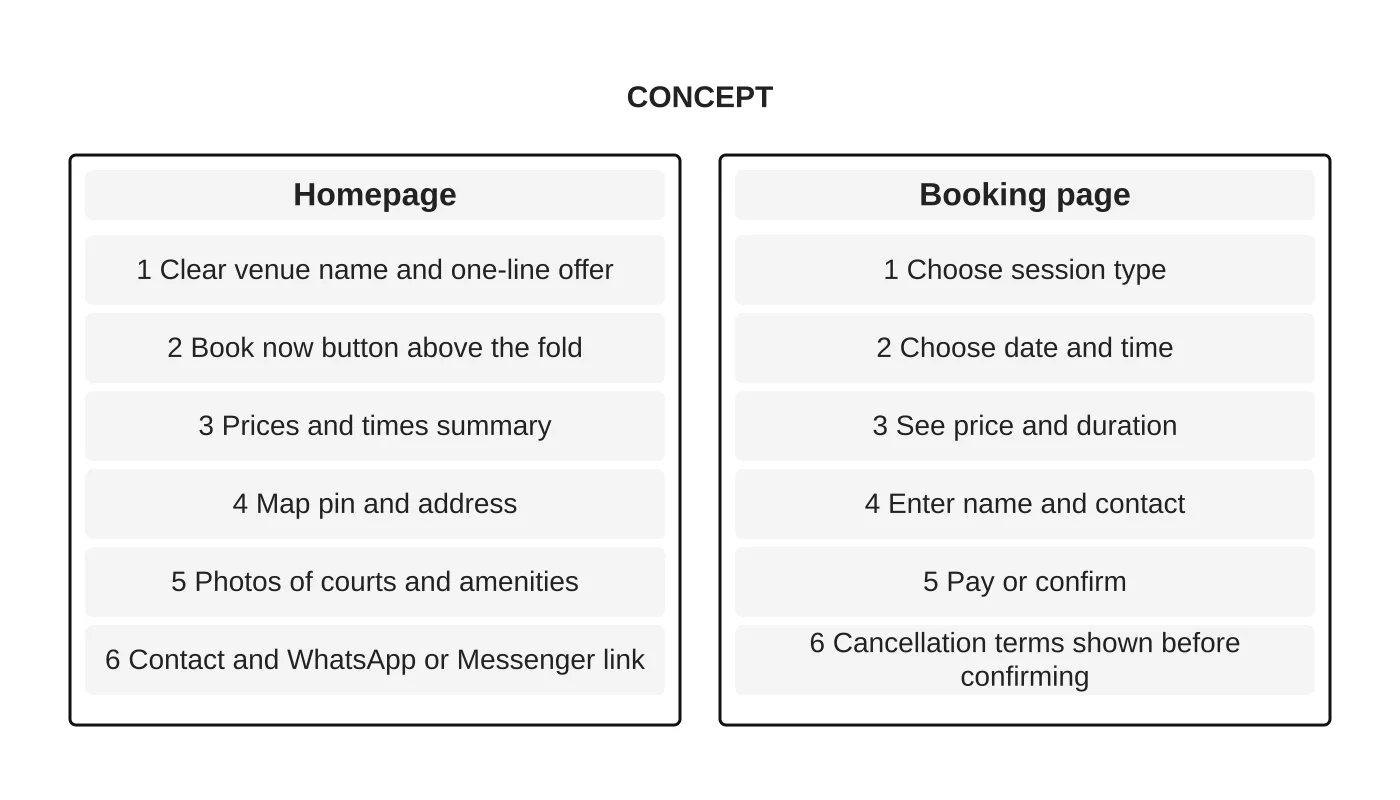
The wireframe above is a concept, not a finished design. Use it as a starting point to discuss your own pages.
Location, contact details and cancellation policy
- Full address, a map link and a short note on landmarks or parking.
- Phone, email and the messaging channels you actually monitor, with expected reply times.
- A short, plain cancellation and rescheduling policy, shown before payment. Keep wording at an operational level; have refund and liability terms reviewed by a suitably qualified person. This is general information, not legal advice. Check your situation with a qualified adviser.
Pre-launch usability checks
- Ask three people who have never visited to find the price and book a slot, without help.
- Test on at least one Android and one iPhone browser, and on a slow mobile connection.
- Submit a test booking and a test enquiry; confirm both are received.
- Check every link, phone number and map pin.
- Check that opening hours, prices and policies match what the venue says on its social profiles and Google listing.
- Confirm that images have text descriptions and that the text is readable against its background.
After launch, keep the details current. Monthly website checks help catch stale prices and broken booking steps. For general guidance on turning visitors into enquiries, see why website structure affects leads. The full plan is in how to market a pickleball court business.
Next step
We design and build business websites in Davao. If you would like a review of your venue’s current site, request a website review for your pickleball venue, or see our web design service.
Frequently asked questions
What do visitors need to know before booking a pickleball court?
Visitors want to know where the venue is, which days and hours it is open, how much it costs and for how long, whether they can turn up or must book, what to bring, and what happens if they need to cancel.
What prices and offers should a court website show?
Give open play, private court hire, coaching and clinics, and memberships their own clearly labelled sections, each with price, duration and conditions. Show prices in Philippine pesos with what is included, and show the table on one screen if prices vary by time of day.
What should I check before launching a court website?
Ask three people who have never visited to find the price and book a slot. Test on an Android and an iPhone browser and a slow mobile connection, submit a test booking and enquiry, and check every link, phone number and map pin.
Sources and notes
This checklist is based on our own web design practice and makes no claim about booking increases. The wireframe is a labelled concept, not a client project.


