

Quick answer
A pickleball membership website must handle sign-up, payment, access, renewals and member questions according to rules you write first. Define what members receive and any booking limits, state renewal, cancellation and refund terms before payment, then test permissions and failed-payment cases before launch. Memberships do not suit every venue, and prepaid sessions may be simpler.
- Do not offer a benefit you cannot deliver at your busiest times; write the rules before choosing software.
- Before payment, state the length, renewal date, whether it renews automatically, how to pause or cancel, and what is refundable.
- Test a new sign-up, a booking beyond entitlement, a failed renewal, a cancellation and a non-member using member offers.
A membership can bring predictable use and a loyal group of players. It can also create complexity: renewals, failed payments, different rules for different people and more questions to answer. Memberships do not suit every venue. This guide helps you decide what a membership needs to do and what your website must handle. For general ideas on building memberships, see how fitness centres build memberships.
1. Define membership benefits and booking entitlements
Write the rules in plain words before you choose software.
- What does a member receive: discounted court hire, earlier booking, reserved sessions, access to events, coaching discounts?
- Is there a limit on bookings or hours?
- Do benefits differ between peak and off-peak times?
- Can members bring guests?
Do not offer a benefit you cannot deliver at your busiest times. If memberships do not fit your venue, a bundle of prepaid sessions may be simpler.
2. Handle sign-up, payment and access
Decide how someone joins and how you will know they are a member when they book.
- Sign-up: an online form or an in-person step, with the terms clear before payment.
- Payment: the methods your members use and how recurring payments work. Check the options and any fees in the payment tool’s current official documentation.
- Access: member prices, early booking or member-only pages. Test that non-members cannot see or use them.
3. Explain renewals, cancellations and refunds
Members get upset by surprises. State, before they pay:
- the length of the membership and renewal date,
- whether it renews automatically and how to stop it,
- how to pause or cancel,
- what is refundable and what is not.
Keep the wording simple and have it reviewed by a suitably qualified person. This is general information, not legal advice. Check your situation with a qualified adviser.
4. Plan member communications and support
Decide what you will send and when: a welcome message, renewal reminders, event notices and policy changes. Separate service messages (a payment failed) from marketing (an offer), and let people choose which marketing they receive. Make a clear route for member questions and decide who answers. See following up pickleball enquiries. A remote assistant can help with routine member messages; see how a virtual assistant can support a club’s administration.
5. Choose software around your actual rules
Take your rules from step 1 and check them against any tool you consider:
- Can it show member pricing and limits?
- Can it handle recurring payments and failed payments?
- Can members update their details without contacting you?
- Can you export your member list?
- What are the total monthly costs?
Booking software choices are covered in online bookings or Messenger.
6. Test permissions and failed-payment scenarios
Before launch, run test members through these cases:
- A new member signs up and books.
- A member books beyond their entitlement.
- A payment fails at renewal.
- A member cancels, pauses and asks for a refund.
- A member changes their email or phone.
- A non-member tries to use a member offer.
Write down what you expect in each case and check the result. After launch, check them again on a schedule; see maintaining a pickleball website.
Membership requirements worksheet and renewal journey
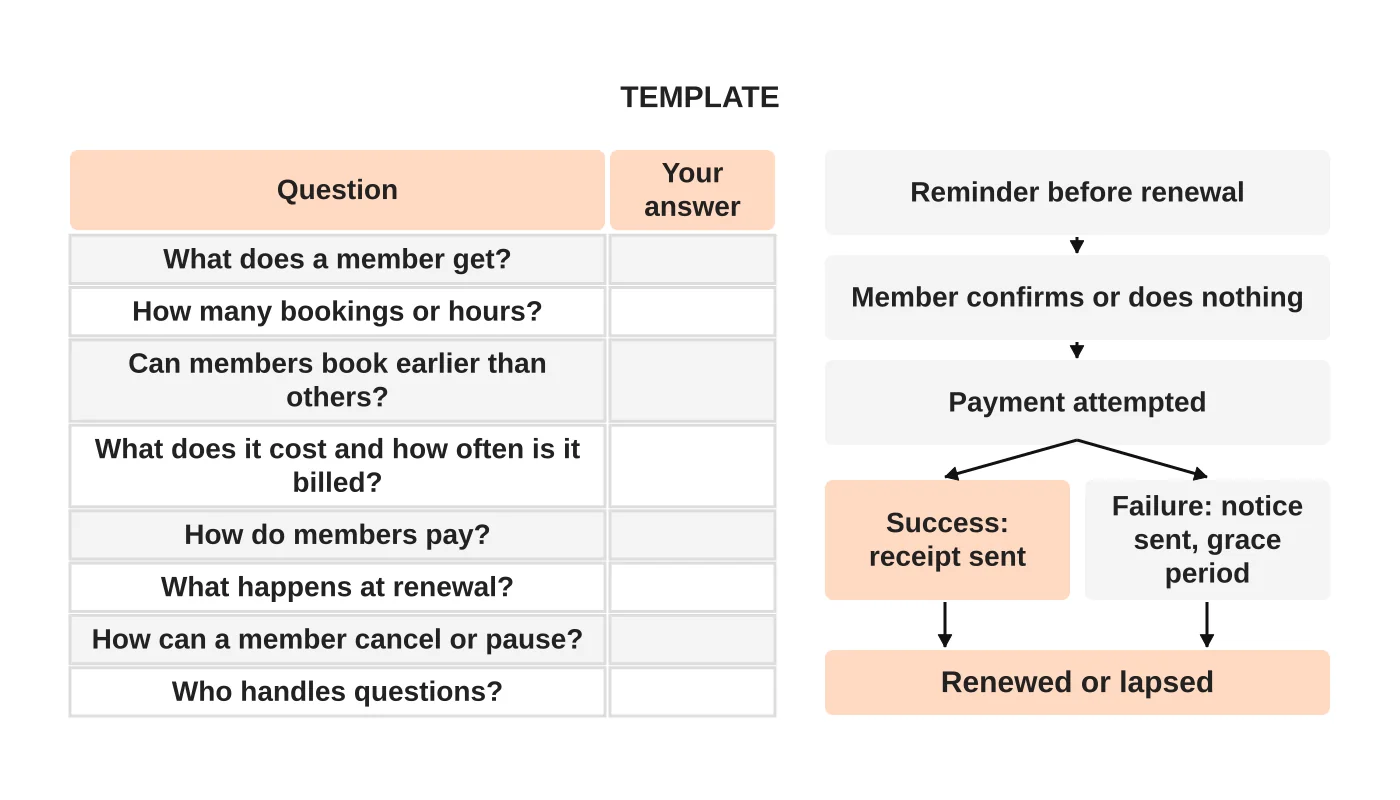
| Question | Your answer |
|---|---|
| What does a member get? | |
| How many bookings or hours are included? | |
| What does it cost and how often is it billed? | |
| What happens at renewal? | |
| How can a member pause or cancel? | |
| Who handles member questions? |
The renewal journey runs: reminder, member confirms, payment attempted, then either a receipt or a failure notice with a short grace period, ending in renewal or lapse. Adjust each step to your rules.
The website basics are in the pickleball court website checklist. The overall plan is in how to market a pickleball court business.
Next step
Share your membership rules so we can scope the website requirements, or see our web design service.
Frequently asked questions
What should pickleball members be told before they pay?
The membership length and renewal date, whether it renews automatically and how to stop it, how to pause or cancel, and what is refundable. Keep the wording simple and have it reviewed by a suitably qualified person. This is general information, not legal advice.
How do I choose membership software for a pickleball venue?
Take your written rules and check them against each tool. Can it show member pricing and limits, handle recurring and failed payments, let members update details, and export your member list? Also check the total monthly costs and the payment tool’s current official documentation.
What member messages should a venue plan for?
A welcome message, renewal reminders, event notices and policy changes. Separate service messages, such as a failed payment, from marketing offers, and let people choose which marketing they receive. Make a clear route for member questions and decide who answers them.
Sources and notes
This guide is based on our own web design practice. No software, fee or legal position is stated, and it does not assume subscriptions suit every venue.


