
Quick answer
To sell pickleball equipment online, organise products the way customers think, with accurate specifications and stock information, original photos and short comparison guidance. Show delivery, returns and payment methods before checkout, test mobile checkout with test orders, and measure profit by channel, not just visits.
- Offer filters such as player level, weight range or indoor and outdoor use only where you can state them accurately.
- Use manufacturer information for specifications, check it against the product and state what you do not know.
- Test failed payments, quantity changes, cancellations and refunds on a phone before launch, not only a successful order.
Selling pickleball equipment online is about helping a customer choose the right item and complete an order without friction. This guide is for retailers of paddles, balls, bags and accessories. It focuses on product discovery and the purchase flow. It does not review paddles, rank products or explain equipment approval rules, which are outside our scope.
1. Build useful product categories and filters
Organise products the way customers think. A beginner may not know the specification terms, so offer both.
- Main categories such as paddles, balls, bags and accessories, apparel and footwear, and court gear.
- Filters for the characteristics that matter to your range, such as player level, weight range or indoor and outdoor use, only where you can state them accurately.
- A search box that handles common spellings and terms.
Keep the number of choices manageable. If a category has few products, a filter may only add clutter.
2. Write accurate specifications and stock information
- Use the manufacturer’s information for specifications, and check it against the actual product.
- State what you do not know instead of guessing.
- Show whether an item is in stock, on back order or made to order, and give a realistic delivery window.
- Keep stock numbers in sync between your shop and any other channels.
If a product is for use in organised competition, tell customers to check the relevant rules of their event. Do not assert approval or certification unless you can show evidence.
3. Use original product photos and comparison guidance
Take your own photos from several angles in good light, with a size reference. Do not reuse a manufacturer’s or competitor’s images without permission. Add short comparison guidance, such as “Who this paddle suits” in your own words, based on facts you can support. For guidance on pages that are clear to shoppers and AI assistants, see ecommerce product pages for shoppers and AI assistants.
4. Explain delivery, returns and payment methods
Before checkout, show:
- delivery areas, costs and times,
- whether pickup is available,
- the returns window and condition required,
- the payment methods you accept.
Keep terms simple and have them reviewed. This is general information, not legal advice. Check your situation with a qualified adviser.
5. Test mobile checkout and notifications
Run test orders on a phone, with each payment method and delivery option.
- Add to cart, change quantity, remove an item.
- Apply a delivery option and an address.
- Pay, fail a payment on purpose, and pay again.
- Check the confirmation, the shop’s order notification and any shipping update.
- Cancel and refund a test order.
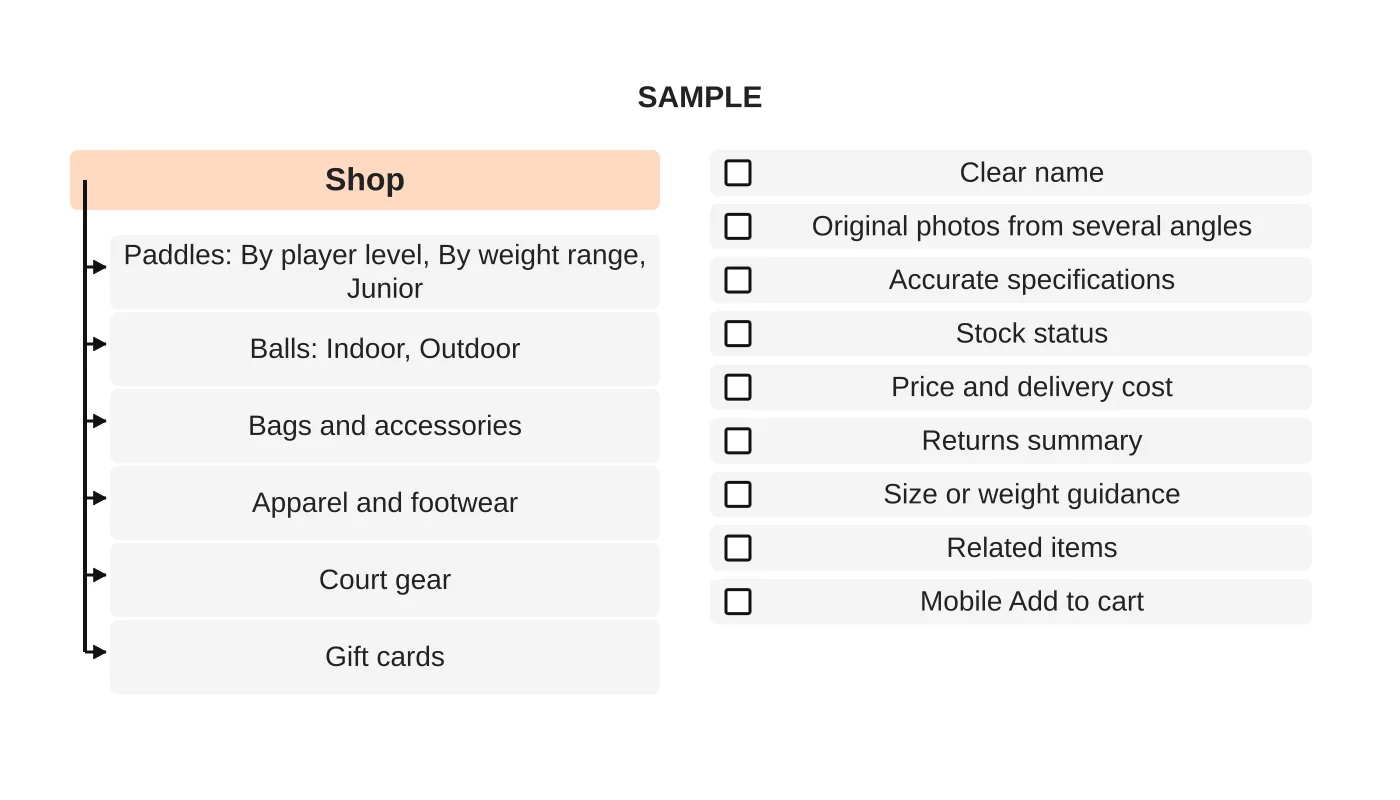
The category tree and checklist above are samples. Adjust them to your range.
6. Connect marketing to profitable orders
An order is only worth having if it leaves a margin after product cost, payment fees, delivery and returns. Measure orders and profit by channel, not just visits. See measuring pickleball marketing results.
A shop can also see traffic spikes at launches or events. See hosting and traffic surges and website care and checks. The overall plan is in how to market a pickleball court business.
Product-page checklist
- ☐ Clear, specific product name
- ☐ Original photos
- ☐ Accurate specifications
- ☐ Stock status and delivery estimate
- ☐ Price including any costs shown before checkout
- ☐ Returns summary
- ☐ Easy mobile Add to cart
Next step
Discuss an online store for your pickleball product range, or see our web design service.
Frequently asked questions
What should a pickleball product page include?
A pickleball product page should include a clear, specific product name, original photos, accurate specifications, stock status and delivery estimate, the price including any costs shown before checkout, a returns summary and an easy mobile Add to cart button.
What should be shown to customers before checkout?
Before checkout, show delivery areas, costs and times, whether pickup is available, the returns window and the condition required, and the payment methods you accept. Keep terms simple and have them reviewed. This is general information, not legal advice.
How do I tell customers about competition rules for equipment?
If a product is for use in organised competition, tell customers to check the relevant rules of their event. Do not assert approval or certification unless you can show evidence, and state what you do not know instead of guessing.
Sources and notes
This guide is based on our own web design practice. No product is rated, no certification is stated and no sales result is claimed.


