

Quick answer
To redesign without losing Google rankings, change as little as possible that search engines have already learned. Map every old URL to a new one, set 301 redirects, build and test on a private copy, keep what works in your structure, launch carefully and monitor. Google says a combined move and redesign will probably cause some traffic loss.
- Make a URL map with old URL, new URL, action and notes; redirect changed pages to their closest equivalent.
- Block the staging copy from indexing, then remove that block at launch and submit a sitemap of live addresses only.
- Compare traffic, enquiries and rankings for top pages at week four, and avoid changing hosting or domain together.
A redesign is the most common way a business loses its Google traffic by accident. New pages, changed URLs and rewritten content can undo years of work, and the damage often shows up weeks after launch. The cause is rarely the design itself. It is what changed underneath it: addresses, structure, content and speed.
Here is a checklist to follow before, during and after a redesign so you keep what is working.
What Google says about site moves
Google’s guidance on moving a site says that 301 and other permanent redirects do not cause a loss in PageRank. It also warns that if you combine a move with a redesign of content and URL structure, you will probably see some traffic loss while Google relearns and reassesses the pages. For a medium-sized site, it can take weeks for most pages to be reflected, and longer for larger sites.
That is why the safest redesign changes as little as possible that search engines have already learned.
Before you start: decide what must not change
Make a short list of the things that earn you traffic and enquiries today:
- Your top 20 pages by search visits and by enquiries.
- The pages that other websites link to.
- Your main headings and the wording of your best-performing titles.
- Your Google Business Profile website link. See the profile optimisation guide.
Protect these. Improve them, but keep their addresses wherever possible.
Related reading: Solar Quote Request Forms: Collecting Useful Details Without Losing Enquiries.
Step 1: map every URL
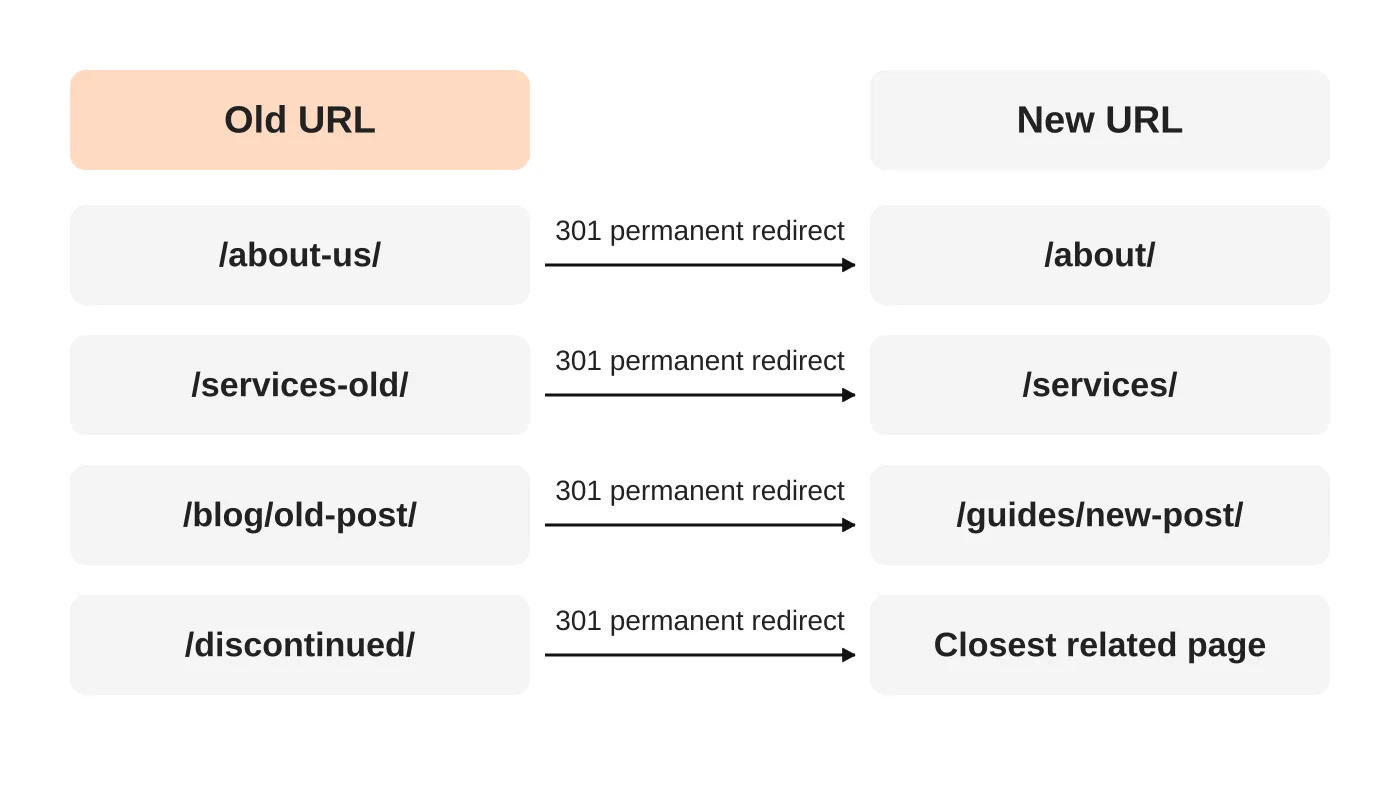
Export every live address from your current site (your sitemap, analytics and Search Console will all help). Make a spreadsheet with four columns: old URL, new URL, action and notes.
- Same address: nothing to do. This is the best outcome.
- Address changes: set a 301 redirect from old to the closest new equivalent.
- Pages merged: redirect each old page to the merged page.
- Pages removed with no equivalent: return a 404 or 410 status for those, as Google recommends, rather than redirecting everything to the homepage.
Step 2: build and test on a private copy
Build the new site on a staging copy that search engines cannot index. Check that:
- Every important page exists and the content is at least as complete as before.
- Titles, headings and descriptions are carried over or improved, not lost.
- Internal links point to new addresses.
- Images have descriptive alt text and files are compressed.
- Mobile pages work well. See website speed and Core Web Vitals.
- Forms, tracking and your privacy notice work. See the Data Privacy Act checklist.
Make sure the staging copy is blocked from indexing, then remember to remove that block at launch. A forgotten “noindex” is a classic launch disaster.
Step 3: keep the structure that works
Do not rebuild your menu from scratch without a reason. Keep one page per service and one per area served, and keep your hub-and-spoke linking so the strongest pages stay close to the homepage. The local SEO structure guide explains why, and the content audit guide shows how to decide which pages to keep, refresh or merge before you start.
Step 4: launch carefully
- Pick a quiet day and time, not a campaign week.
- Switch on redirects at the same time as the new site.
- Remove any staging “noindex” settings.
- Confirm your sitemap lists only the new, live addresses and submit it in Google Search Console.
- Check the homepage, ten top pages and every redirect manually.
- Keep the old site’s backup safe for at least a few months.
If the address of your whole website changes (for example, a new domain), follow Google’s Change of Address process in Search Console. If you are only moving between www and non-www on the same domain, Google says to use canonical tags or redirects instead.
After launch
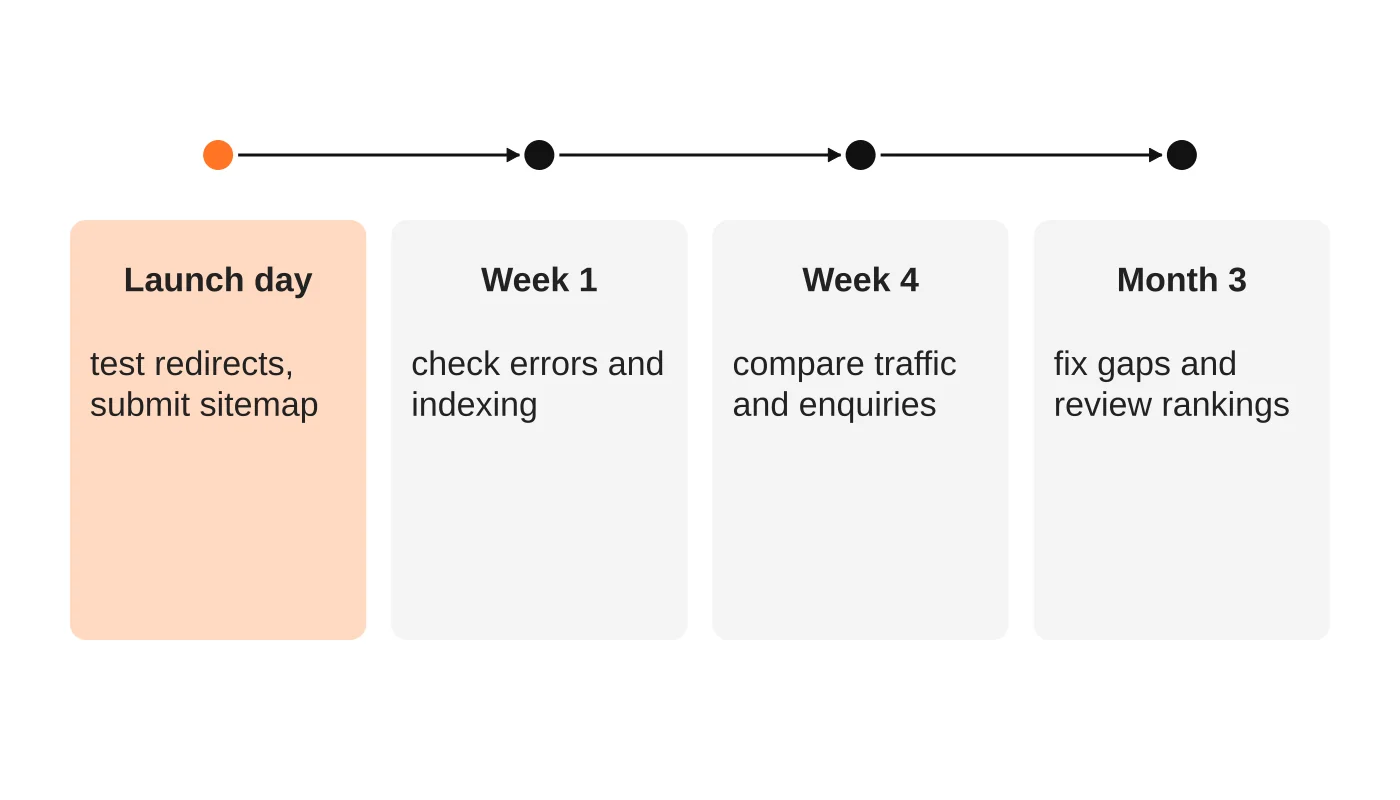
- Launch day: test redirects, submit the sitemap, check tracking works.
- Week one: look for crawl errors, “not found” pages and pages not indexed.
- Week four: compare traffic, enquiries and rankings for your top pages against the weeks before launch. Some movement is normal.
- Month three: fix gaps, update internal links and review whether the redesign has improved enquiries. Turning website analytics into decisions helps with the review.
Common mistakes
- Changing URLs for tidiness alone.
- Redirecting every old page to the homepage.
- Leaving the staging “noindex” in place.
- Dropping content, headings or FAQs that earned traffic.
- Forgetting the old pages that other sites link to.
- Launching without a backup of the old site.
- Changing hosting, platform and design at the same time.
If you are changing providers, follow this plan for moving hosts without disrupting email.
Frequently asked questions
How long until my traffic recovers?
It depends on the size of the site and how much changed. Google says it can take weeks for a medium-sized site. If you changed less, recovery is faster.
Do I need a redesign or just improvements?
Often improvements to speed, content and structure give more benefit than a full redesign. Is your website built to scale? helps you decide.
Should I change my domain at the same time?
Avoid it if you can. Do one big change at a time.
Will changing hosting hurt rankings?
Not by itself, if the URLs stay the same and the new host is as fast and reliable.
What should I tell my web developer?
Give them this checklist and ask for the URL map before any build work starts.
Plan the move properly
Web Design Davao’s web design and development team maps URLs, protects your rankings and checks the site after launch. Ask about a redesign.


