

Quick answer
A remote virtual assistant can take on a pickleball club’s daily administration, such as replying to enquiries, confirming bookings, sending reminders and updating member records. Keep on-site duties like court setup, safety, first aid and cash with venue staff. Give the assistant approved templates, escalation limits and only the system access the role needs.
- List recurring tasks and weekly time for each, and write steps first for any task that has none.
- Split replies into what the assistant may answer and what goes to a manager, such as complaints and refunds.
- Use a separate named login with limited access, never shared passwords, and review the access regularly.
A busy club or multi-court venue spends many hours on tasks that do not need someone standing at the courts: answering messages, confirming bookings, sending reminders and updating records. A remote virtual assistant can take on some of that work. This guide explains how to define the role clearly, keep on-site responsibilities with your own staff and review how it is going. The right role depends on what your club needs.
1. List booking, membership and enquiry tasks
Write down the recurring tasks and how long each takes in a normal week:
- replying to enquiries from the website and social channels,
- confirming, changing and cancelling bookings,
- sending reminders and confirmations,
- updating member records and renewal reminders,
- preparing event registration lists,
- scheduling approved social posts.
If a task has no clear steps yet, write them first. See our guide on writing SOPs for a virtual assistant.
2. Separate remote work from on-site duties
Keep with your venue staff everything that requires presence or physical judgement: court setup, safety, first aid, handling cash, equipment, supervising sessions and dealing with people at the venue. A remote assistant should not be responsible for on-site safety. If something urgent happens, the assistant’s job is to alert a named person, not to decide.
3. Set response templates and escalation limits
Provide approved wording for the most common messages, and a limit for what the assistant may decide. For example:
- May answer: prices, times, location, how to book, standard policies.
- Must escalate: complaints, refunds, injuries, safety questions, press or sponsor requests, unusual requests and anything not covered by the template.
State how fast the assistant should hand things over and how. For message flows see following up pickleball enquiries.
4. Give role-appropriate system access
Give the assistant only the access the role needs, using a separate named login, not a shared password. Do not share payment card data, bank logins or admin accounts. Review the access regularly and remove it when it is no longer needed. Make sure that people whose data is held, such as members, are told how it is used. This is general information, not legal advice. Check your situation with a qualified adviser.
Our guide on how to delegate to a virtual assistant covers general delegation.
5. Train and review the first month
A good first month looks like this:
- Week 1: walk through the tasks, tools, templates and escalation list. Start with low-risk tasks.
- Week 2: the assistant does the tasks while you check every output.
- Week 3: spot-check a sample, and correct patterns.
- Week 4: review what works, adjust templates and agree what to expand or stop.
Agree the working hours, how time zones are handled and when the assistant is available.
6. Measure accuracy, response quality and workload
Track a few simple measures:
- accuracy: bookings and records that needed correction,
- response time against your target,
- quality: whether customers got a clear next step,
- workload: hours spent and what remains with staff.
See measuring pickleball marketing results for tracking enquiries and bookings.
VA role brief and delegation matrix
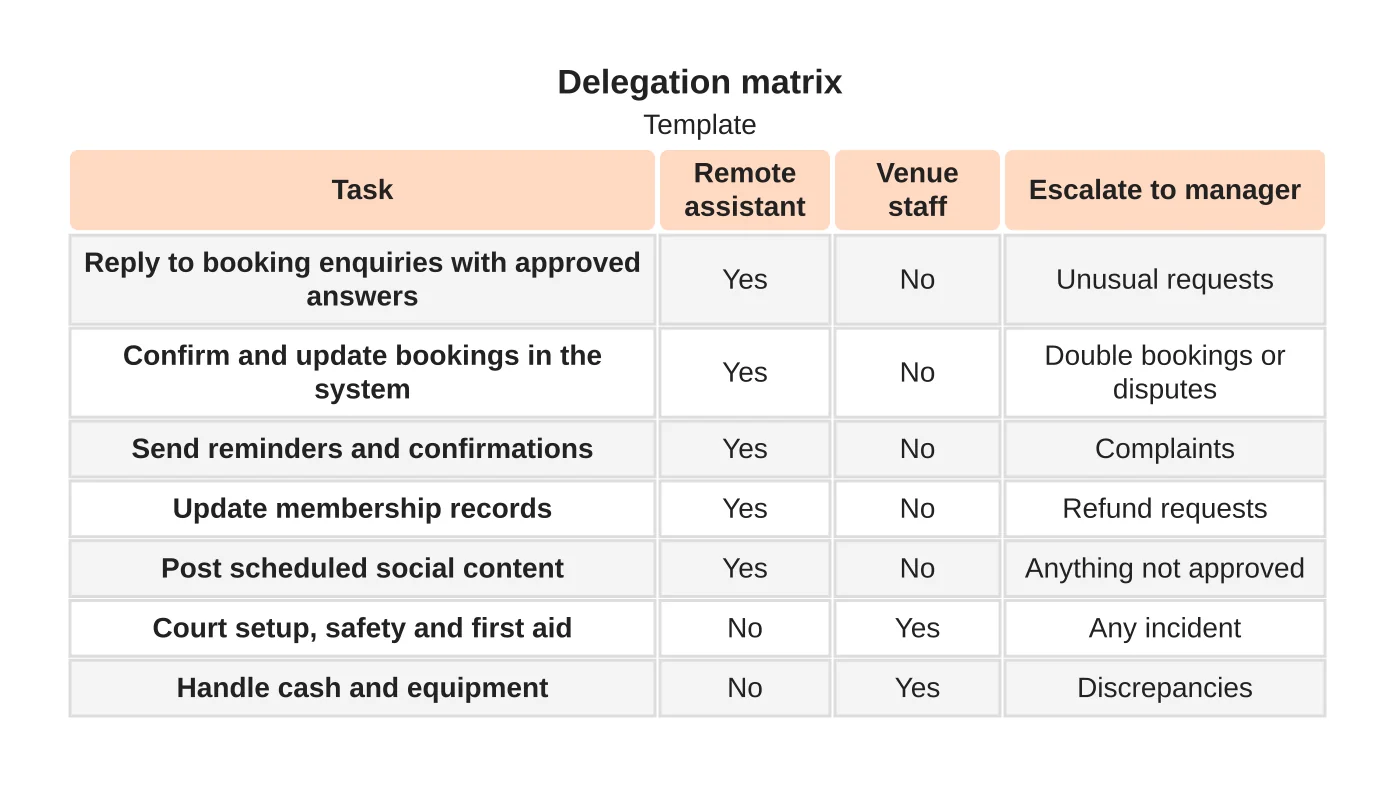
| Task | Remote assistant | Venue staff | Escalate to manager |
|---|---|---|---|
| Reply to enquiries using approved answers | Yes | No | Unusual requests |
| Confirm and update bookings | Yes | No | Double bookings and disputes |
| Send reminders and confirmations | Yes | No | Complaints |
| Update membership records | Yes | No | Refund requests |
| Schedule approved social posts | Yes | No | Anything not approved |
| Court setup, safety and first aid | No | Yes | Any incident |
| Handle cash and equipment | No | Yes | Any discrepancy |
This is a template. Tailor it to your club, your systems and your risk tolerance.
Related guides: marketing a pickleball tournament and membership websites. The overall plan is in how to market a pickleball court business.
Next step
Send us your recurring tasks and required hours so we can discuss a staffing role, or see our outsourced staffing service.
Frequently asked questions
Which pickleball club tasks suit a remote assistant?
Replying to enquiries using approved answers, confirming and updating bookings, sending reminders, updating membership records and scheduling approved social posts. Court setup, safety, first aid, cash and equipment stay with venue staff.
What should the assistant escalate?
Complaints, refunds, injuries, safety questions, press or sponsor requests, unusual requests and anything not covered by a template. If something urgent happens, the assistant’s job is to alert a named person, not to decide.
What does a good first month look like?
Week one walks through tasks, tools, templates and escalation. In week two the assistant works while you check every output. Week three is spot-checking a sample, and week four is a review of what works and what to expand or stop.
Sources and notes
This guide is based on our own practice. No price, hours, availability, outcome or saving is stated, and no pickleball client is implied.


