
Quick answer
Audit website content by listing every page, adding evidence from Search Console and analytics, then deciding page by page to keep, refresh, merge or remove. Fix inaccurate or risky pages first, refresh pages already earning impressions, merge duplicates with a 301 redirect, and delete last, only after checking nothing is worth saving.
- Do not delete old content just because you think Google dislikes it; removal does not make other pages rank higher.
- Record address, last updated date, search visits, enquiries, links and any overlapping page for each page.
- Remove only wrong, harmful or empty pages with nothing better to point to, and never redirect everything to the homepage.
“Your website isn’t broken, it’s being ignored” is the argument of Your Website Isn’t Broken — It’s Being Ignored, and it describes most small business sites. Pages are published and then left. Facts go out of date, three posts say the same thing, and the pages that should win enquiries are buried under ones that do not.
A content audit is how you take stock. This guide shows you how to run one without deleting things that still help.
What Google says about old content
Before you delete anything, note what Google’s own people have said. Google’s Search Liaison has said that you should not delete content just because you think Google dislikes old content, and that older content can still be helpful. Google’s John Mueller has also said that removing content does not make the rest rank higher. Google’s guidance points instead to self-assessment: decide whether a page is helpful to visitors and keep what is.
Google does say that removing pages can be right where information is out of date and potentially harmful, and for very large sites crawl efficiency can be a factor. For a small business site, the sensible approach is to fix and combine first, and delete last.
When prices, staff or services change, use this website content update checklist.
Step 1: build the inventory
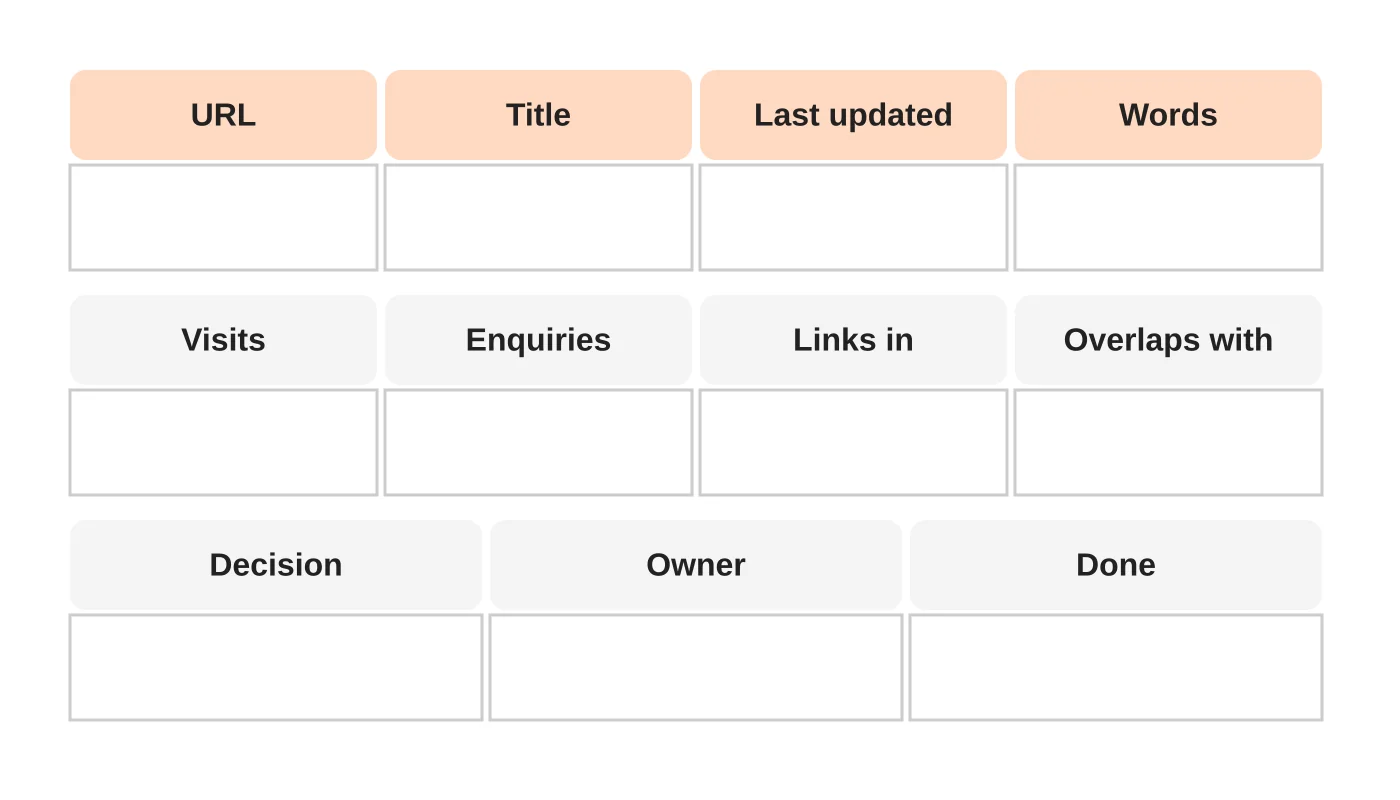
List every page and post. Your sitemap, your website’s admin list and Google Search Console will all help. For each, record the address, title, last updated date, approximate word count, search visits, enquiries, which other pages link to it and any other page that covers the same topic.
For a site with 150 posts, this takes a few hours. It is the most useful few hours you will spend.
Read next: Turn Supplier PDF Catalogues into Useful Website Product Pages.
Step 2: add the evidence
- Search Console: impressions, clicks and the queries each page appears for.
- Analytics: visits and, if you track them, enquiries or calls that started on the page.
- Links: which pages other websites link to, since those need extra care.
- Quality notes: is it accurate, current, clear and specific to your business?
Use Google’s own self-assessment questions in “Creating helpful, reliable, people-first content” to judge quality honestly.
Step 3: decide, page by page
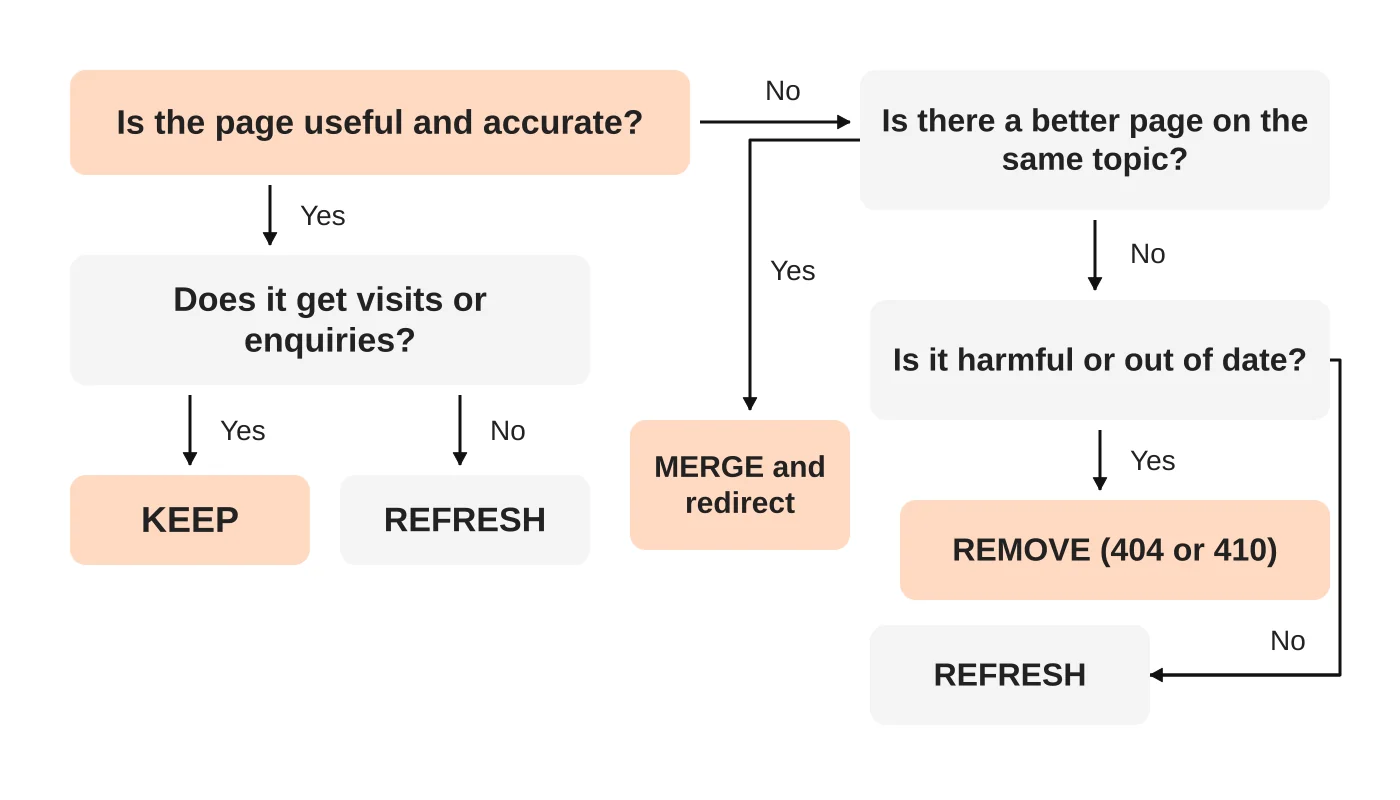
Keep
The page is accurate, useful and doing its job. Make small improvements and move on.
Refresh
The topic is right but the page is thin, dated or unclear. Update facts, add examples, improve headings, add images and link to your newer guides. Keep the same address.
Merge
Two or more pages cover the same topic and compete with each other. Combine the best parts into one stronger page, then redirect the weaker addresses to it with a 301. See the redesign checklist for redirect rules.
Remove
The page is wrong, harmful, empty or has no value and no better page to point to. Return a 404 or 410 status, and remove internal links to it. Do not redirect everything to the homepage.
Not sure what a topic needs? Learn when to use a service page or a blog article for each search.
Related reading: Does Your Website Need a Refresh?
Spot the common problems
Look for these patterns in a typical small business blog:
- Empty or near-empty posts left over from drafts or imports. Decide whether to write them out or redirect them.
- Near-duplicates written for the same keyword years apart. See how to use keywords for choosing one canonical page.
- Dated advice, such as years in titles, retired product names or old regulations.
- Weak internal links. Strong pages with no links to your service pages.
- Posts with no images or alt text.
- Pages that do not say who wrote them or why they can be trusted. See SEO and E-E-A-T.
Step 4: act in a sensible order
- Fix what is wrong and risky: inaccurate, harmful or legally sensitive content first.
- Refresh your best pages: those with impressions and clicks already have the most to gain.
- Merge duplicates and set redirects.
- Add links from refreshed pages to your service pages and newer guides.
- Remove the rest only after you have checked there is nothing worth saving.
- Update your sitemap and re-check Search Console after a few weeks.
Record every decision in the spreadsheet so that nobody undoes it later.
Build the audit into your routine
Do a light review each quarter and a full one each year. Tie it to a publishing plan so new content does not recreate old problems. A 90-day content plan helps you decide what to write next, and a repurposing workflow helps you get more from your best pages.
Add a routine check for broken links and missing downloads to your upkeep.
Frequently asked questions
Will deleting old posts improve my rankings?
Not by itself, according to Google staff. Improve or combine pages that can be helpful, and remove only what is wrong or useless.
What about posts with traffic but no enquiries?
Refresh them with a clear next step and links to the relevant service page.
How do I handle two posts on the same keyword?
Choose the stronger one, merge the best content into it and redirect the other.
Do I need a tool?
A spreadsheet is enough for most small sites. Paid crawlers help on larger ones.
How long will this take?
A hundred pages take a day or two for the inventory and decisions, and several weeks to act on.
From the Wired for Growth newsletter
This guide builds on Your Website Isn’t Broken — It’s Being Ignored from Duarne Bernhagen’s LinkedIn newsletter, Wired for Growth.
Sources
- Google warns against content pruning as CNET deletes thousands of pages, Search Engine Land
- Google: Removing content does not make the rest rank higher, Search Engine Roundtable
- Google: You decide what old content is helpful or not, Search Engine Roundtable
- Creating helpful, reliable, people-first content, Google Search Central
Want a second opinion
Web Design Davao’s SEO team can audit your content and give you a keep, refresh, merge or remove list. Ask for a content audit.


